• Logo
    PaperBananaAI Academic Illustration Generator
Home
  • Home
  • Studio
  • Scientific Illustration Generator
  • Poster Maker
  • Diagram Maker
  • Figure Editor
  • Pricing
My Creations
  • My Creations
  • Invite Friends
LogoPaperBanana
HomePromptsBlogPricingInvite Friends
  1. Home
  2. Tools
  3. Neural Network Diagram Generator
PaperBanana

PaperBanana - AI-powered academic illustration generator

support@paperbanana.me
All Tools

Tool directory

AI Figure Tools

  • Scientific Illustration
  • Graphical Abstract Maker
  • Scientific Poster Maker
  • Scientific Diagram Maker
  • Scientific Figure Editor
  • Prompts

Research Diagrams

  • Conceptual Framework Generator
  • Neural Network Diagram Generator
  • PRISMA Flow Diagram Generator
  • CONSORT Flow Diagram Generator

Graphic Organizers

  • Graphic Organizer Maker
  • Frayer Model Maker
  • KWL Chart Maker
  • Cause and Effect Graphic Organizer
  • Compare and Contrast Graphic Organizer
  • Spider Diagram Maker
  • Plot Diagram Maker
  • Syntactic Tree Generator
  • Sentence Diagram Generator
  • Punnett Square Maker
  • Venn Diagram Maker

Math & Physics

  • Factor Tree Generator
  • Number Line Generator
  • Force Diagram Maker
  • Bohr Model Maker

Data Visualization

  • Sankey Diagram Generator
  • Scatter Plot Maker
  • Dot Plot Maker
  • Forest Plot Maker
  • Funnel Plot Maker
  • Kaplan-Meier Curve Maker
  • Box Plot Maker
  • Heatmap Generator
  • Volcano Plot Generator
  • Phylogenetic Tree Generator

Image & Submission

  • Journal Figure Checker
  • Image Format Converter

© 2026 PaperBanana. All Rights Reserved.

Support

  • About
  • Blog
  • Pricing
  • Contact

Legal

  • Privacy Policy
  • Terms of Service
  • Acceptable Use
Online · Runs in your browser

Neural Network Diagram Generator: Turn Layer Sizes into a Figure

Neural Network Diagram Generator draws a fully connected feedforward network from layer sizes. Compare architectures, check weights and biases, and export editable SVG, PNG, or a CSV parameter report for your paper, slides, or lesson.

No sign-up or watermarkCompare architectures and parameter countsSVG, PNG, and reusable JSON

Configure your network

One Label,count pair per line. Use 2–10 layers, 1–10,000 neurons per layer, and labels up to 24 characters.

Diagram settings are processed in your browser. No account, upload, or AI credits needed.

Network preview

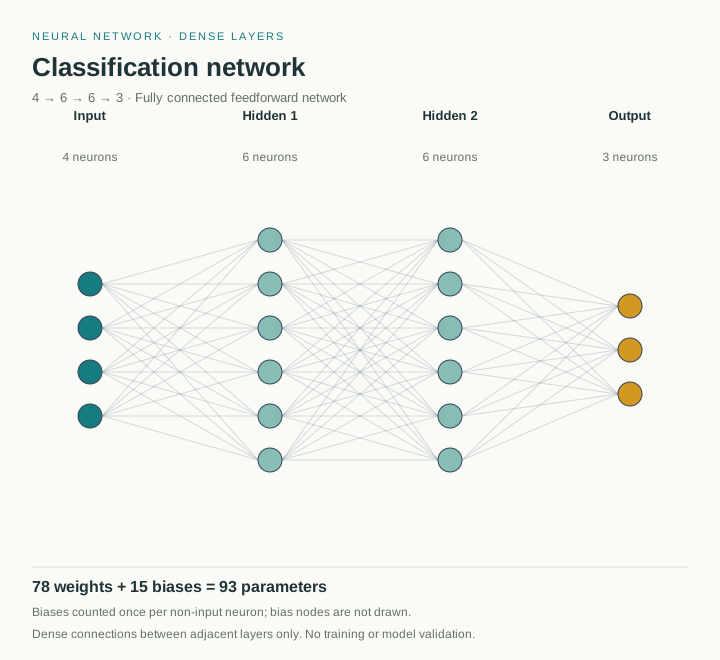
Classification network: Input, 4; Hidden 1, 6; Hidden 2, 6; Output, 3

Full-network counts

Neurons
19
Weights / connections
78
Biases
15
Total parameters
93
Parameter breakdown
Layer transitionWeight matrix (out × in)Weights / connectionsBiasesParameter share
Input → Hidden 16 × 424632.26%
Hidden 1 → Hidden 26 × 636645.16%
Hidden 2 → Output3 × 618322.58%

For adjacent dense layers: weights = inputs × outputs; biases = outputs when enabled. Bias nodes are not drawn. Matrix dimensions use output units × input units. Each row’s share is its weights plus biases divided by the full-network parameter total.

Lines show topology, not learned weights. Hiding connections does not change the model count.

This tool draws fully connected feedforward networks. It does not train a model or import PyTorch/Keras code.

Compare network architectures

Pin a baseline, then edit the layer list or load another example. See exactly how the parameter count changes.

No baseline pinned. Save the current network here before changing its layers.

The CSV includes layer dimensions, weights, biases, parameter totals, and each transition’s share. With a baseline pinned, it includes both networks and their total differences.

Comparison uses full dense-layer sizes, including abbreviated nodes. Fewer parameters do not guarantee better accuracy or faster inference. The baseline lasts until you clear it or reload the page; JSON saves the current network only.

Need a scientific illustration for your paper?

Turn your research methods, mechanisms, and workflows into clear figures with paper banana.

From architecture to figure

Create an artificial neural network diagram from layer sizes

A neural network diagram shows the layers, neurons, and connections that define an architecture. For a multilayer perceptron, a row of layer sizes is enough to start drawing.

Enter the structure you already know. This builder lays out dense layers, labels each one, and calculates weights and biases separately. Use the result to communicate an architecture. It does not simulate learning.

01

Define the structure

Name your input, hidden, and output layers, then set a neuron count for each.

02

Check the parameter math

Inspect each layer transition before using the total parameter count in your work.

03

Keep an editable source

Save a JSON configuration alongside the SVG or PNG so you can revise the diagram later.

Choose an artificial neural network template for your diagram

Each preview is drawn by this generator. Load a network and change its layers to match your own architecture.

Built for clear explanations

Use a neural network diagram maker for research and teaching

Start from a known architecture and make its structure easy to inspect.

Illustrative machine learning workspace with neural network sketches

Prepare architecture figures for research papers

Researchers can turn a known dense model into an editable SVG for a manuscript or thesis. Check the layer sizes and parameter report before applying the journal’s final figure formatting.

Simple three-layer dense network for a teaching slide

Explain dense layers in machine learning lessons

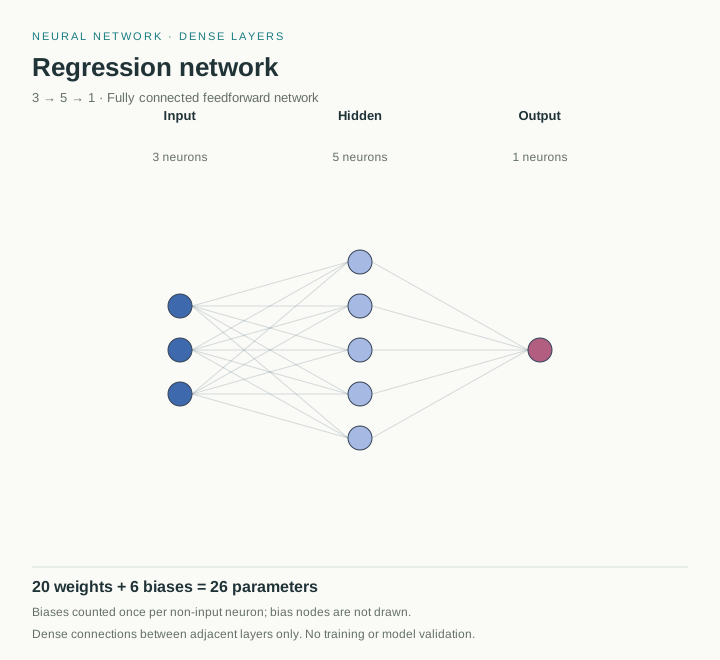
Teachers can use the 3–5–1 regression example to show input, hidden, and output layers. Toggle biases and inspect matrix dimensions to explain where the parameter count comes from.

Dense autoencoder showing encoder, latent and decoder layers

Compare model sizes during architecture reviews

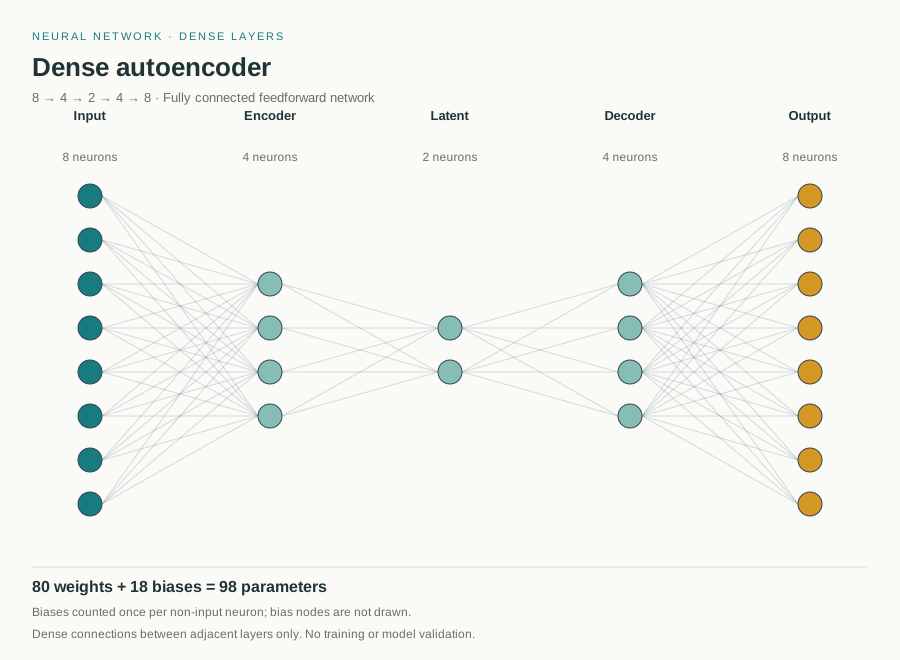
ML engineers can pin an architecture, revise its hidden layers or bottleneck, and export both parameter reports. Use the size comparison alongside separate model evaluations, not as an accuracy score.

Build, verify, reuse

Edit an MLP diagram for papers, slides, and model reviews

Adjust a multilayer perceptron diagram from its actual layer sizes. Labels, connections, and counts update together as you revise the architecture.

Label dense layers clearly for lecture slides

Rename input, hidden, and output layers, select a palette, and adjust spacing. Hide dense connections when your audience needs to focus on the layer structure.

Create Your Neural Network Diagram Now
A labeled classification network with teal hidden layers and gold output nodes

Fit large network architectures into a readable figure

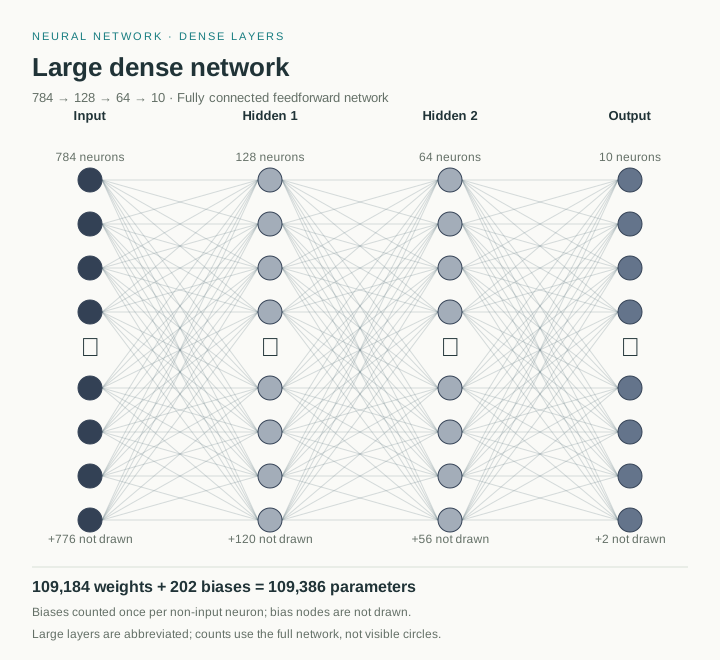
Keep a 784-unit input layer readable with eight visible circles, an ellipsis, and an omitted-node count. The full neuron count remains labeled, and parameter calculations still include every dense connection.

Create Your Neural Network Diagram Now
Large dense network with ellipses and actual neuron counts

Keep editable figures and parameter reports for later revisions

Download SVG for vector editing or PNG for slides and documents. Save JSON to reopen the current network, and export a CSV of matrix dimensions, weights, biases, and parameter shares for your experiment notes.

Create Your Neural Network Diagram Now
Dense autoencoder vector preview with editable layer structure
Check before you publish

Compare neural network architectures and audit every parameter

Pin your current architecture as a baseline, change its layers, and inspect the weight, bias, and total parameter differences. Open the per-layer breakdown to find which transitions account for the largest share.

Keep a baseline while you edit

Pin the 4–6–6–3 classifier with biases enabled, then load the 3–5–1 regression example. The total changes from 93 to 26 parameters: 67 fewer, a 72.04% reduction. This compares size, not predictive quality.

Inspect matrix dimensions and parameter shares

Each transition shows its weight matrix dimensions as output units × input units and its share of the network’s parameters. Counts use full layer sizes even when the diagram abbreviates large layers.

Export an auditable comparison report

Download a CSV containing each transition’s dimensions, weights, biases, parameters, and percentage share. When a baseline is pinned, the report includes both architectures, their bias settings, and total differences.

Classifier diagram with 78 weights and 15 biases
Pin 4–6–6–3 as baseline, then load 3–5–1: 93 → 26 parameters (−72.04%).Reproducible size comparison

Less drawing, more explaining

Revise your neural network architecture diagram without starting over

Keep the diagram and its underlying settings together.

Live preview

Revise the architecture quickly

Change a neuron count or add a hidden layer and the diagram and parameter table update together.

Two image formats

Use the right output for the job

SVG preserves sharp lines and editable labels. PNG is convenient for documents, slides, and quick sharing.

Reopen your settings

Return to the same setup

Download your JSON file and load it again when a reviewer asks you to change the architecture figure.

A short workflow

How to draw a neural network diagram online

Go from a layer list to a downloadable figure in four steps.

01

Choose a neural network template

Load a classifier, regression network, dense autoencoder, or abbreviated large network.

02

Enter and customize dense network layers

Write one Label,count pair per line. The first layer is input and the last layer is output.

03

Compare architectures and check parameters

Pin a baseline before changing layers. Compare parameter totals, inspect matrix dimensions and each transition’s share, and adjust the bias setting.

04

Export the diagram and parameter report

Download SVG or PNG and a CSV parameter report. Save JSON to reopen the current network later; the comparison baseline is kept only for this page session.

Generate Neural Network Diagram Now
PaperBanana classifier example after configuring four dense layers, ready for SVG or PNG export
The image exports contain the diagram, layer counts, and parameter summary.

Continue your figure workflow

Explore related diagram tools

Use these tools for the surrounding figure or final export.

View All Tools
Scientific diagram example

Scientific Diagram Maker

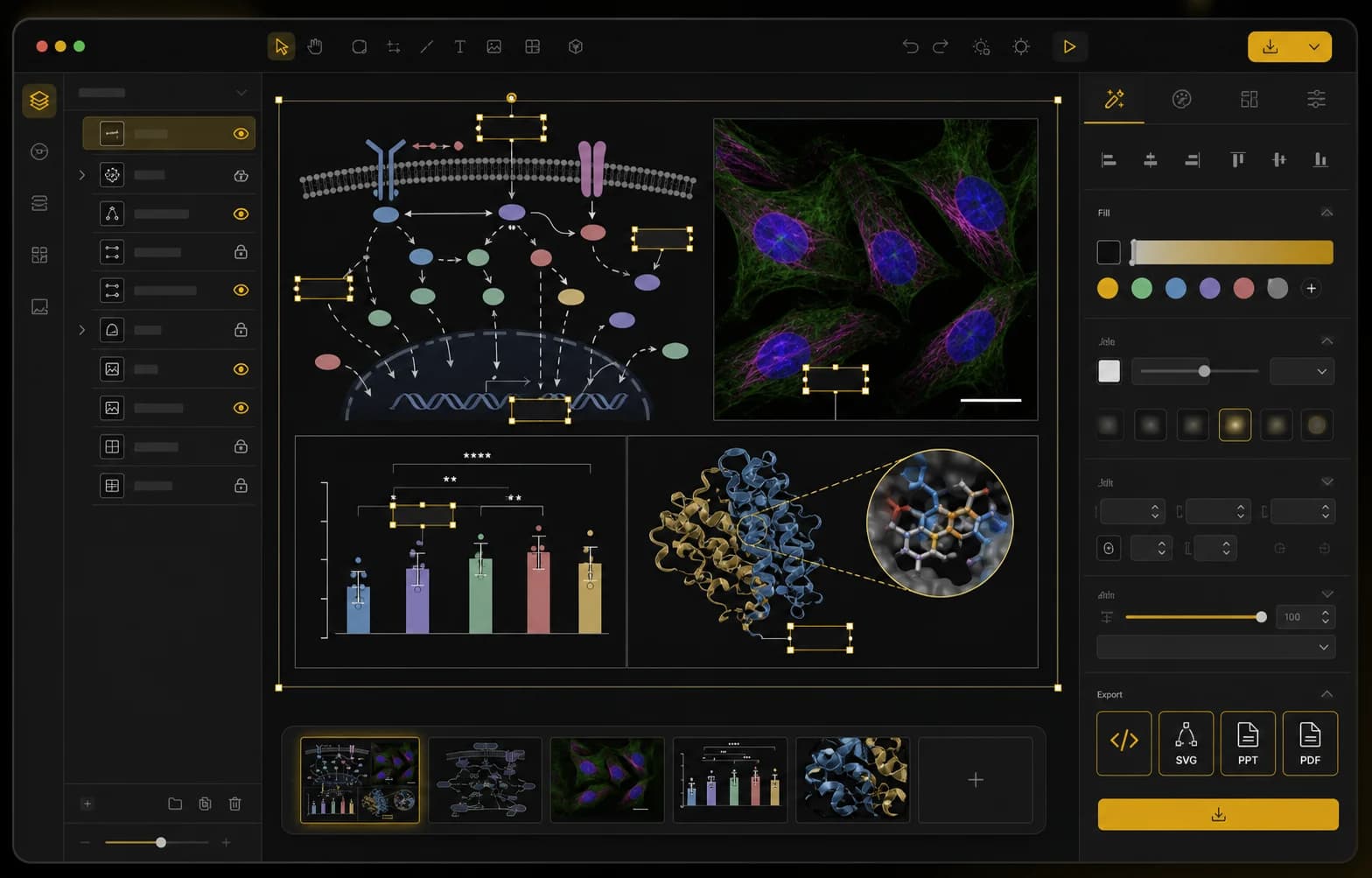
Scientific Figure Editor workspace for refining research figures

Scientific Figure Editor

Journal figure checker preview

Journal Figure Checker

Image format converter preview

Image Format Converter

Questions before you draw

Neural Network Diagram Generator FAQ

How do I draw a neural network diagram online from layer sizes?+

Create a neural network diagram online by entering one Label,count pair per line: Input,4, Hidden,6, then Output,3. Use 2–10 layers with 1–10,000 neurons each. The preview updates when the list is valid. Choose colors and spacing, check the counts, then download SVG or PNG without writing drawing code.

What can I export with this neural network diagram generator online?+

Export SVG and PNG diagrams, CSV parameter reports, and JSON settings for later editing. No account, watermark, or AI credits are required. You can configure dense layers, load four examples, preview changes, and compare architectures. Calculations and exports run in your browser.

Which models does this neural network architecture diagram generator support?+

The tool draws fully connected feedforward networks, including MLPs and dense autoencoders. For convolution kernels and feature maps, use a dedicated convolutional neural network diagram generator. This version does not draw CNN, RNN, or Transformer architectures, train models, or import PyTorch or Keras code.

How does the neural network parameter calculator count weights and biases?+

For each adjacent dense layer pair, multiply input units by output units to count weights. Add one bias per output unit when biases are enabled. The layer table shows output-by-input matrix dimensions and parameter shares. Totals exclude convolution, weight sharing, normalization, recurrent connections, and attention.

How can I compare neural network architectures and export a parameter report?+

Pin the current network as a baseline, then edit layers or load another example. Compare weights, biases, total parameters, and the percentage change. Download CSV to keep both architectures, their layer dimensions, parameter shares, and total differences. A smaller count does not establish better accuracy or faster inference.

How are large neural network diagrams displayed without losing the full counts?+

Layers above eight neurons show eight circles, an ellipsis, and an omitted-node count. The full layer size remains labeled, and all statistics use the actual sizes. For example, 784–128–64–10 has 109,184 weights plus 202 biases when enabled, even though only 32 circles appear.

How do I export a neural network diagram for papers, slides, or LaTeX?+

Download SVG for editable vector shapes and labels, or PNG at twice the diagram dimensions for documents and slides. For a LaTeX workflow, use the PNG or convert the SVG to a format your setup supports. This tool does not export PDF, TikZ, or LaTeX source code.

How do I save a neural network diagram and edit it later?+

Save JSON to keep the current layer list, labels, title, colors, spacing, bias setting, and connection visibility. Load that file to restore the network. The pinned comparison baseline is not included: it remains only until you clear it or reload the page. Download comparison CSV before leaving.

Your next architecture figure

Create a neural network diagram you can verify and revise

Enter your dense layer sizes, compare a second architecture, and export a labeled figure with its parameter report. Configuration and calculations run in your browser.

Create Neural Network Diagram Now