• Logo
    PaperBananaAI Academic Illustration Generator
Home
  • Home
  • Studio
  • Scientific Illustration Generator
  • Poster Maker
  • Diagram Maker
  • Figure Editor
  • Pricing
My Creations
  • My Creations
  • Invite Friends
LogoPaperBanana
HomePromptsBlogPricingInvite Friends
  1. Home
  2. Tools
  3. Sankey Diagram Generator
PaperBanana

PaperBanana - AI-powered academic illustration generator

support@paperbanana.me
All Tools

Tool directory

AI Figure Tools

  • Scientific Illustration
  • Graphical Abstract Maker
  • Scientific Poster Maker
  • Scientific Diagram Maker
  • Scientific Figure Editor
  • Prompts

Research Diagrams

  • Conceptual Framework Generator
  • Neural Network Diagram Generator
  • PRISMA Flow Diagram Generator
  • CONSORT Flow Diagram Generator

Graphic Organizers

  • Graphic Organizer Maker
  • Frayer Model Maker
  • KWL Chart Maker
  • Cause and Effect Graphic Organizer
  • Compare and Contrast Graphic Organizer
  • Spider Diagram Maker
  • Plot Diagram Maker
  • Syntactic Tree Generator
  • Sentence Diagram Generator
  • Punnett Square Maker
  • Venn Diagram Maker

Math & Physics

  • Factor Tree Generator
  • Number Line Generator
  • Force Diagram Maker
  • Bohr Model Maker

Data Visualization

  • Sankey Diagram Generator
  • Scatter Plot Maker
  • Dot Plot Maker
  • Forest Plot Maker
  • Funnel Plot Maker
  • Kaplan-Meier Curve Maker
  • Box Plot Maker
  • Heatmap Generator
  • Volcano Plot Generator
  • Phylogenetic Tree Generator

Image & Submission

  • Journal Figure Checker
  • Image Format Converter

© 2026 PaperBanana. All Rights Reserved.

Support

  • About
  • Blog
  • Pricing
  • Contact

Legal

  • Privacy Policy
  • Terms of Service
  • Acceptable Use
Sankey chart maker for researchers

Sankey Diagram Generator: Turn Excel or CSV Data into Figures

Paste source, target, and value rows from Excel or CSV, and this Sankey diagram generator draws each flow in proportion to its value. Check unbalanced nodes, split outgoing flows evenly, and download SVG or PNG in your browser.

Paste from Excel or CSVFlow balance checkOne-click equal splitLive proportional previewSVG and PNG export

Live Sankey diagram generator

Enter your flow data

Paste three columns from Excel or a CSV file. A header row is optional. Values must be positive, and each node name must be spelled the same way in every row.

Split outgoing flows evenly

Pick a source with at least two outgoing flows. One click divides its current total equally across those branches. All other rows stay as they are.

3 branches share 100 GWh in total.

Flow check

Every intermediate node balances.

Your data stays in this browser. Nothing is uploaded to generate or download the chart.

Updates as you type

Live Sankey preview

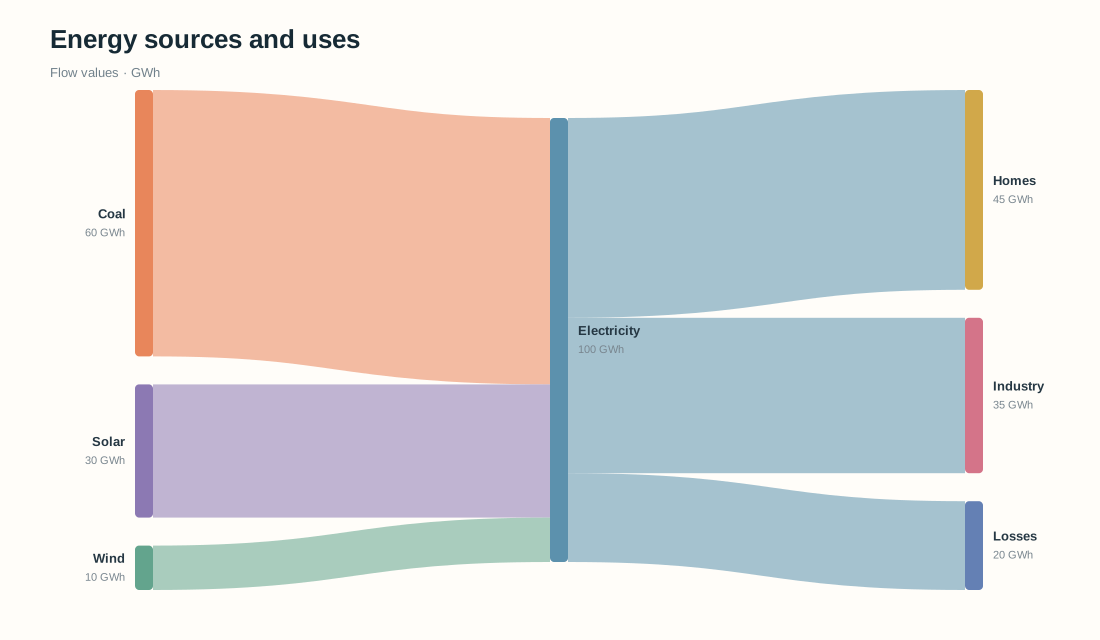
6 flows · 7 nodes

Energy flow by source and use — Sankey diagramFlows are proportional to their values. Each colored ribbon connects a source to a target.Energy flow by source and useFlow values · GWhCoal → Electricity: 60 GWhElectricity → Homes: 45 GWhElectricity → Industry: 35 GWhElectricity → Losses: 20 GWhSolar → Electricity: 30 GWhWind → Electricity: 10 GWhCoal60 GWhElectricity100 GWhSolar30 GWhWind10 GWhHomes45 GWhIndustry35 GWhLosses20 GWh

Need a scientific illustration for your paper?

Turn your research methods, mechanisms, and workflows into clear figures with paper banana.

Understand the chart

What Is a Sankey Diagram and When Should You Use One?

A Sankey diagram shows how a quantity moves between stages. Each ribbon connects a source to a target, and its width is proportional to the value. Major routes, splits, and losses are visible at a glance.

Researchers use Sankey charts for energy balances, material flows, patient pathways, budgets, and any system where a measurable quantity passes through connected steps. The chart works best when every row has a clear source, target, and number.

This Sankey diagram generator draws your rows instantly and flags any intermediate node whose incoming and outgoing totals differ. A mismatch can be meaningful, so the tool reports it and never changes your data on its own.

01

Source

Where a flow starts, such as coal, rainfall, or a study cohort.

02

Target

The next stage or destination that receives the quantity.

03

Value

A positive number that sets the ribbon width.

04

Balance

Compare total input and output at each intermediate node.
Sankey Diagram Examples for Energy, Materials, and Patient Flows

Load an energy, materials, patient, or funding example to see the source, target, value rows behind each Sankey chart. Then replace the sample values with your own.

Use cases

Sankey Chart Maker for Energy, Materials, and Clinical Research

Pick the use case closest to your dataset, then swap in your own numbers to show where a quantity comes from and where it ends up.

Energy Sankey chart with coal, solar, and wind inputs flowing to electricity, homes, industry, and losses

Map energy inputs and losses in a technical report

Compare fuel and renewable inputs with electricity uses, storage, and losses in one proportional energy flow diagram.

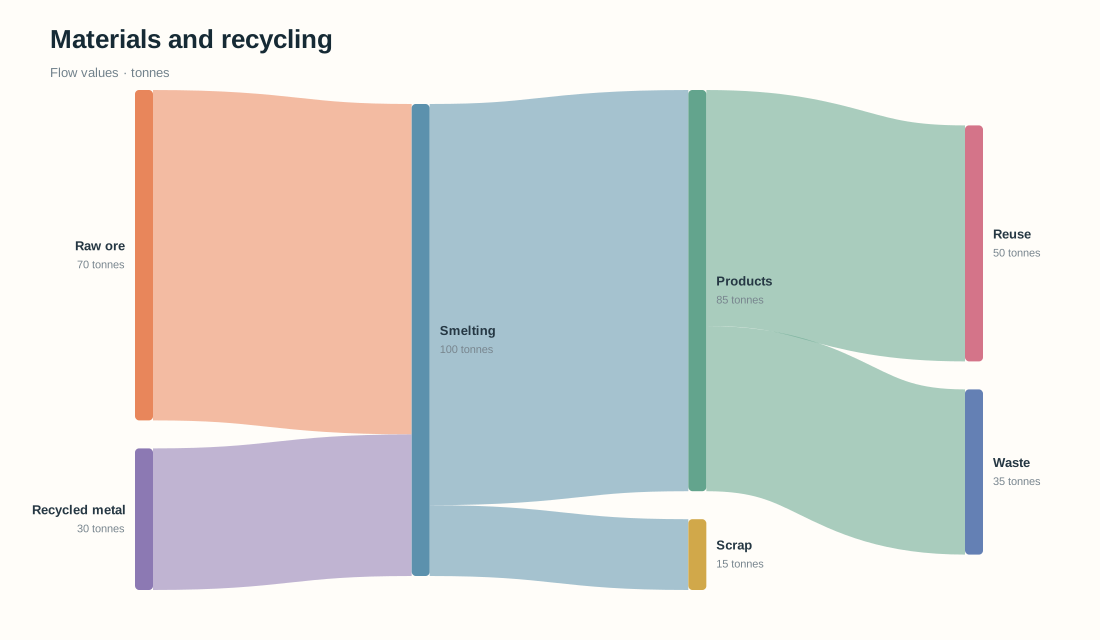
Material flow Sankey chart of raw ore and recycled metal moving through smelting, products, reuse, and waste

Trace material reuse and waste in a process study

Follow raw and recycled inputs through production to products, reuse, scrap, and waste.

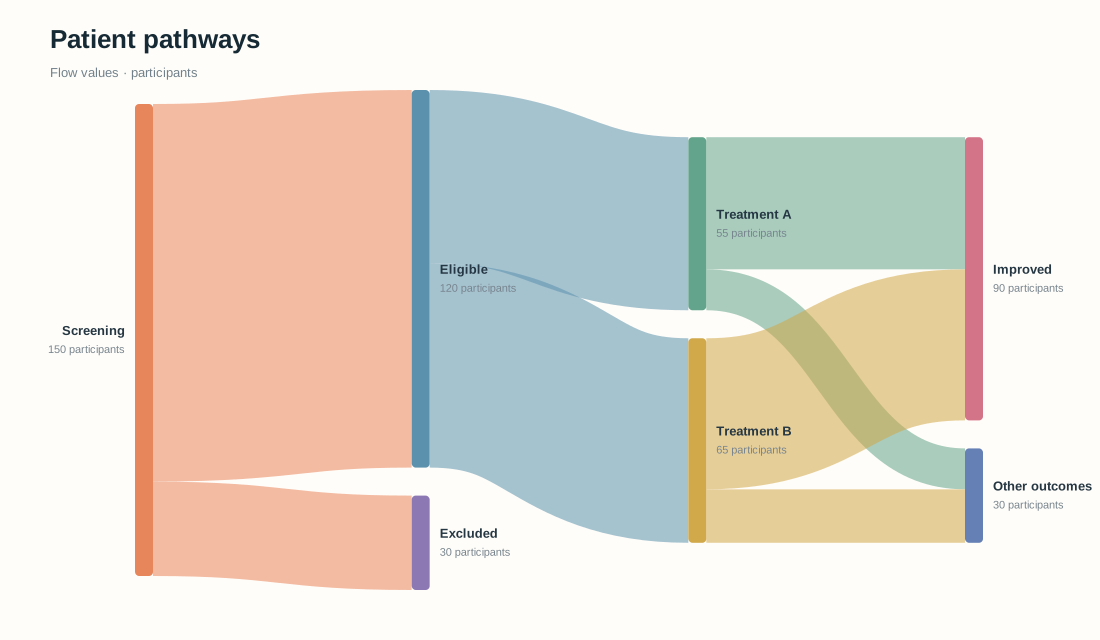
Patient Sankey diagram showing screening, exclusions, two treatments, and outcomes

Show participant pathways in clinical research

Show screened, excluded, treated, and outcome groups while keeping every cohort size visible.

Generator features

Online Sankey Chart Generator: Check, Split, and Export Flows

Start from a source, target, value table, adjust planned allocations, and export once the flows look right.

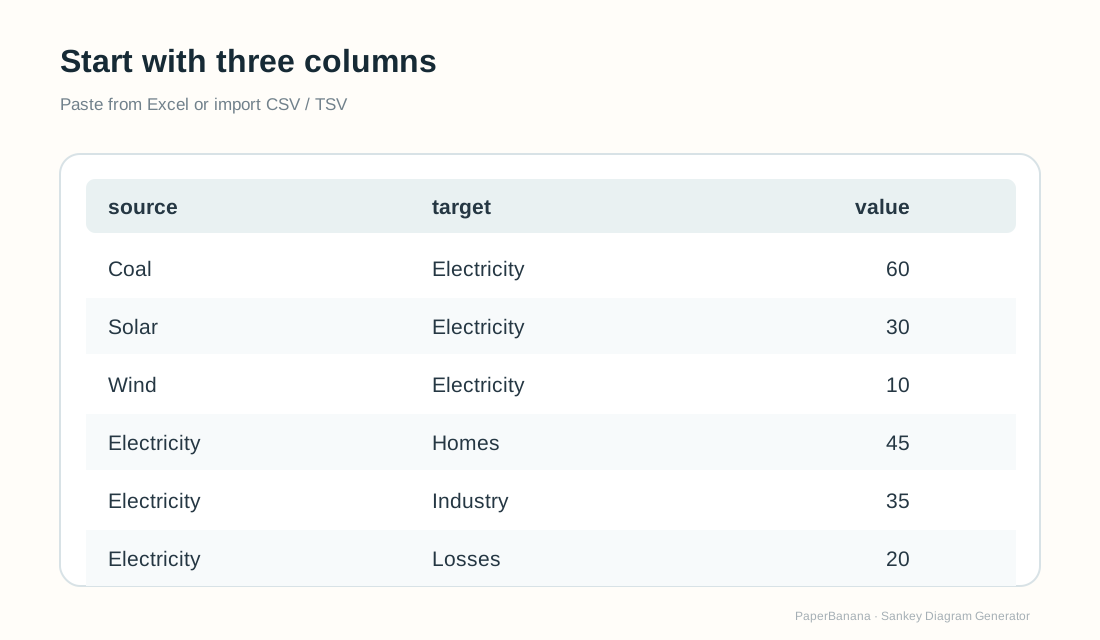
Paste Excel or CSV Rows and See Your Flows Instantly

Paste source, target, and value columns from a spreadsheet, or import a CSV or TSV file. Each valid row becomes a ribbon whose width matches its value.

Create Sankey Diagram Now
Source, target, value rows pasted from Excel to build a Sankey diagram

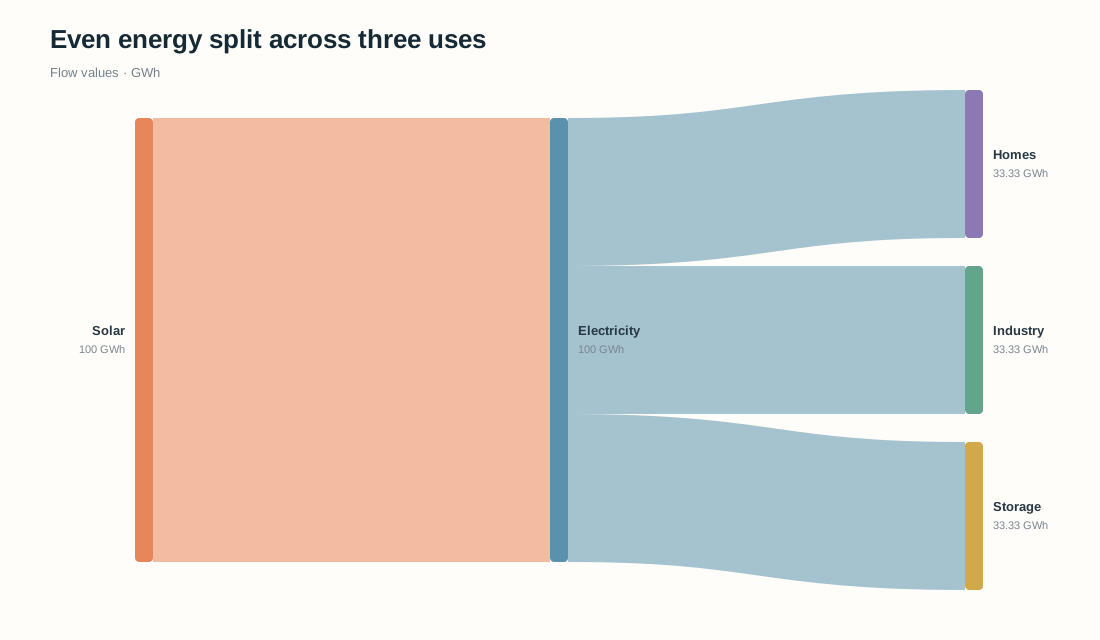
Split a Budget or Energy Source Evenly in One Click

Choose a source with several outgoing routes and divide its current total equally. Other rows stay unchanged, the total stays the same, and you can undo the change.

Create Sankey Diagram Now
Equal split in the Sankey diagram generator dividing electricity into three nearly equal 33.3 GWh branches

Export SVG for Papers and PNG for Slides

Download a scalable SVG to edit in vector software, or a high-resolution PNG for a report or presentation. Check labels and values against your data before submitting a research figure.

Create Sankey Diagram Now
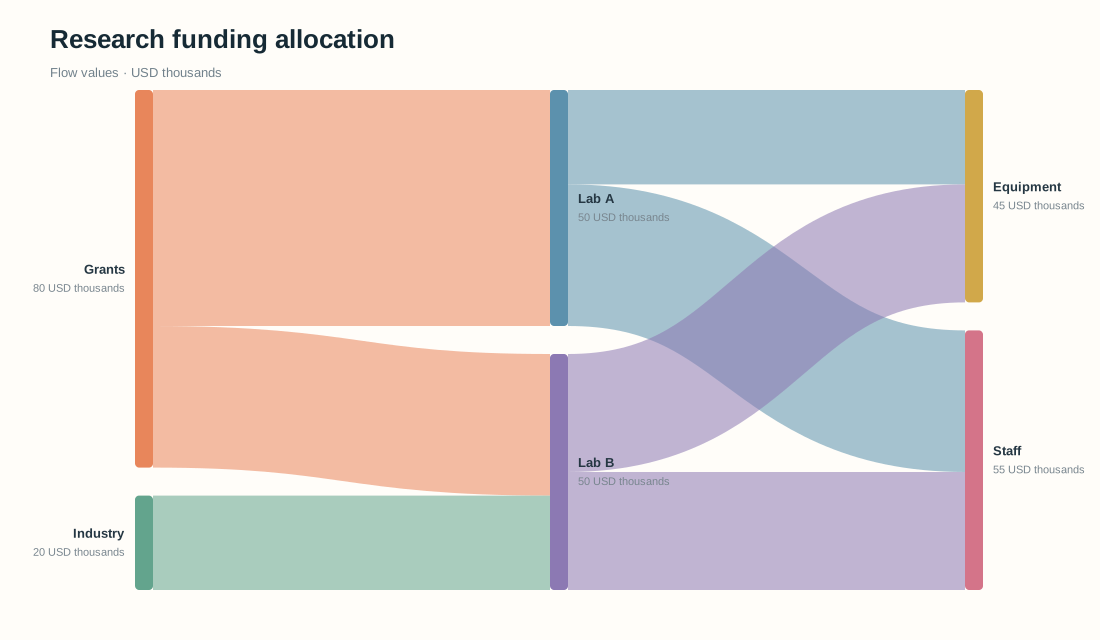
Research funding Sankey diagram ready to export as SVG or PNG
Data checks

Check Flow Balance Before You Export Your Sankey Chart

Find incomplete rows and compare incoming with outgoing values at intermediate nodes before the figure goes into a report.

Catch invalid rows

Missing nodes, rows where source equals target, and zero or negative values are flagged before you export.

Find unbalanced stages

For nodes that have both inputs and outputs, compare the incoming and outgoing totals.

Keep your measurements intact

Warnings explain the gap without adding loss paths or changing values. Only the Equal split action redistributes the outgoing values of a source.

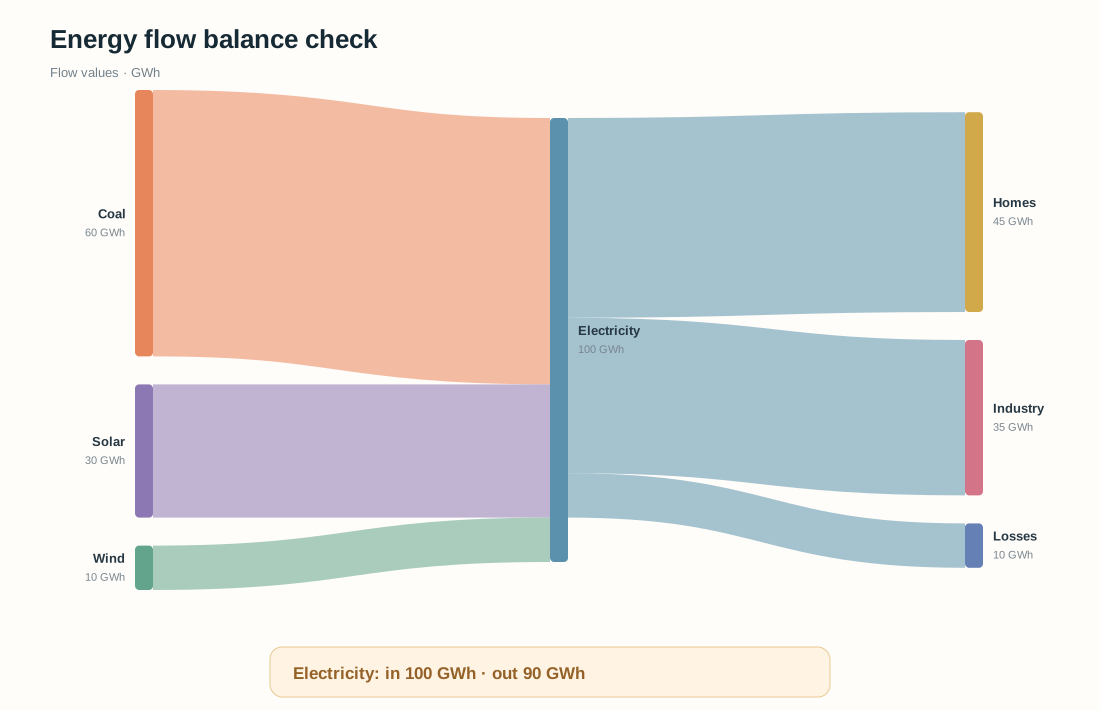
Sankey diagram where Electricity receives 100 GWh and sends out 90 GWh, shown beside a flow balance warning
A balance warning tells you to verify the data. It never corrects it automatically.Flow checked

Why use this generator

Why Use This Sankey Diagram Generator for Research?

Turn the tables you already have into proportional flow figures, with data checks and export in one place.

Proportional

Ribbon widths that match your data

Thickness follows each numeric value, so what readers see matches your numbers.

Simple Input

Start from the table you already have

Paste three columns from a spreadsheet or import a CSV or TSV file.

Flow Check

Spot gaps before you publish

Review differences at intermediate nodes before you present or publish a chart.

Live Preview

Edit and see the result instantly

Change a number, label, title, unit, or palette and the chart updates as you type.

SVG + PNG

Clean SVG and PNG, no watermark

Download vector SVG or high-resolution PNG with no signup and no watermark.

Private

Data stays in your browser

Chart data is processed locally for the preview and the downloads.

Three-step workflow

How to Make a Sankey Diagram from Excel or CSV

Paste or import source, target, value data, check the live preview, then download your chart.

01

Paste Excel rows or import a CSV

Enter source, target, and positive value columns. Spell node names the same way in every row, and use one unit throughout.

02

Check flows and customize the chart

Review the proportional ribbons and any balance warnings. Choose a palette, title, and unit. Use Equal split only when you want to redistribute planned outgoing values.

03

Download SVG or PNG

Export SVG for vector editing or PNG for slides and drafts. Check every label and value against your source data.

Make a Sankey Diagram Now
Source, target, value table ready to paste into the Sankey Diagram Generator
Start with a spreadsheet or CSV table. The live preview updates as you type.

Related research tools

Explore Other Research Data Visualization Tools

Choose a diagram for the flow or data structure you need to show next.

View All Tools
Scientific diagram example

Scientific Diagram Maker

Clustered research heatmap

Heatmap Generator

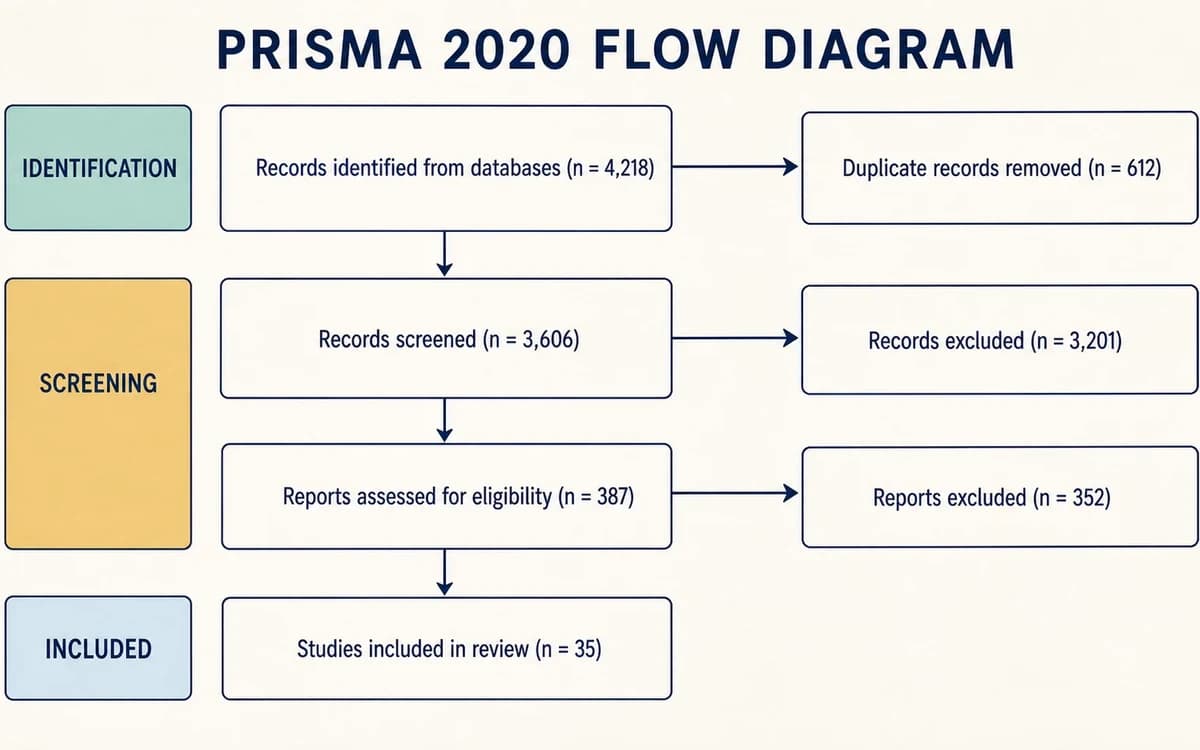
PRISMA 2020 flow diagram with identification, screening, eligibility, and included studies

PRISMA Flow Diagram Generator

Clinical trial recruitment and randomized allocation into two participant groups

CONSORT Flow Diagram Generator

Frequently asked questions

Sankey Diagram Generator FAQ: Data, Balance, and Export

What data format does a Sankey diagram generator need?+

Each row needs a source, a target, and a positive number, with one row per connection. Spell every node the same way each time it appears, and keep all values in one unit. A header row is optional. This page accepts up to 200 flows and 60 nodes.

How do I make a Sankey diagram from Excel or CSV?+

Paste three adjacent columns from Excel or Google Sheets, or import a CSV or TSV file with source, target, and value. No coding or special syntax is needed, and the preview redraws as soon as the rows are parsed. A header is optional, but every row must use the same column order.

How do I create an energy flow Sankey diagram online?+

List each energy source, conversion step, and end use as source, target, value rows, such as Coal, Electricity, 60. Keep one unit, like GWh, and add a Losses row so inputs and outputs balance. Load the energy example to start, then replace its values with yours.

How do I check flow balance in a Sankey chart?+

Open the Flow check panel and compare incoming and outgoing totals at each intermediate node. A warning names the node and both totals, while the diagram keeps your values. A gap can be legitimate storage, waste, or a missing link, so verify it against your source data.

How do I split Sankey diagram branches evenly?+

Add two or more outgoing rows for one source, select it under Equal split, and click Split evenly. Only those outgoing values change. Their current total stays the same, and the last branch absorbs any rounding. Use Undo if your measured values should stay as entered.

How do I export a Sankey diagram as SVG or PNG for PowerPoint?+

Click Download PNG for an image that drops straight into PowerPoint slides, or Download SVG for a scalable figure you can edit in vector software. Both files come from the live preview and keep your title and unit. Check labels and journal requirements before submitting.

When should I use a Sankey diagram instead of a flowchart or alluvial diagram?+

Use a Sankey diagram when quantities matter and ribbon width should show how much moves between stages. Use a flowchart to explain decisions or sequence without quantities. Choose an alluvial diagram when group membership changes across several points in time.

Is my data safe in this online Sankey diagram generator, and do I need to sign up?+

No signup or coding is needed. The generator parses pasted text and imported files in your browser, and the preview, SVG download, and PNG download all run locally, so your flow rows are not uploaded. Avoid confidential data on shared devices and review the chart before you publish it.

Start with your own flows

Create a Sankey Diagram Online from Your Own Data

Paste source, target, value rows, check the flow balance, and export a diagram for your paper, report, or slides.

Try Sankey Diagram Generator