• Logo
    PaperBananaAI Academic Illustration Generator
Home
  • Home
  • Studio
  • Scientific Illustration Generator
  • Poster Maker
  • Diagram Maker
  • Figure Editor
  • Pricing
My Creations
  • My Creations
  • Invite Friends
LogoPaperBanana
HomePromptsBlogPricingInvite Friends
  1. Home
  2. Tools
  3. Sentence Diagram Generator
PaperBanana

PaperBanana - AI-powered academic illustration generator

support@paperbanana.me
All Tools

Tool directory

AI Figure Tools

  • Scientific Illustration
  • Graphical Abstract Maker
  • Scientific Poster Maker
  • Scientific Diagram Maker
  • Scientific Figure Editor
  • Prompts

Research Diagrams

  • Conceptual Framework Generator
  • Neural Network Diagram Generator
  • PRISMA Flow Diagram Generator
  • CONSORT Flow Diagram Generator

Graphic Organizers

  • Graphic Organizer Maker
  • Frayer Model Maker
  • KWL Chart Maker
  • Cause and Effect Graphic Organizer
  • Compare and Contrast Graphic Organizer
  • Spider Diagram Maker
  • Plot Diagram Maker
  • Syntactic Tree Generator
  • Sentence Diagram Generator
  • Punnett Square Maker
  • Venn Diagram Maker

Math & Physics

  • Factor Tree Generator
  • Number Line Generator
  • Force Diagram Maker
  • Bohr Model Maker

Data Visualization

  • Sankey Diagram Generator
  • Scatter Plot Maker
  • Dot Plot Maker
  • Forest Plot Maker
  • Funnel Plot Maker
  • Kaplan-Meier Curve Maker
  • Box Plot Maker
  • Heatmap Generator
  • Volcano Plot Generator
  • Phylogenetic Tree Generator

Image & Submission

  • Journal Figure Checker
  • Image Format Converter

© 2026 PaperBanana. All Rights Reserved.

Support

  • About
  • Blog
  • Pricing
  • Contact

Legal

  • Privacy Policy
  • Terms of Service
  • Acceptable Use
English grammar tool for lessons and practice

Sentence Diagram Generator: Build Reed–Kellogg Diagrams

Enter the subject, verbs, objects, and modifiers of an English sentence, and this sentence diagram generator draws the Reed–Kellogg diagram for you. Check word coverage, make a student worksheet with its answer key, and download SVG or PNG. No signup needed.

Editable sentence partsStudent worksheets + answer keysWord coverage checkSVG and PNG, no watermark

Build from sentence parts

You choose each word’s role and the tool draws the diagram. It does not parse full sentences for you. Separate modifiers with commas.

01 · Subject
02 · Predicate 1
Prepositional phrases

Phrase 1

Check words against your original sentence

This compares words, including repeated words. It does not parse the sentence or check whether your grammar analysis is correct.

Your sentence diagram

Live SVG
Classroom output

Shows your completed diagram and numbered answers matching the student worksheet. This reflects your input, not an automatically graded analysis. Downloads use the selected version. Switch versions without losing your edits.

Sentence diagram teacher answer keyThe clever foxTEACHER ANSWER KEY · REVIEW YOUR ANALYSISfoxThecleverjumpedquicklyoverdogthelazyPractice sentence: The clever fox quickly jumped over the lazy dog.Numbered answers: 1. fox · 2. The · 3. clever · 4. jumped · 5. quickly · 6. over · 7. dog · 8. the · 9. lazy

No signup · No watermark · Sentence data stays in your browser

Structure check

All required parts are filled. Review the grammatical roles before exporting.

Word coverage

Every word from the original sentence is represented.

Supports English diagrams with a simple subject, one or two predicates, objects or subject complements, comma-separated modifiers, and up to four prepositional phrases. Embedded clauses, compound subjects, questions, and infinitive constructions need a more advanced analysis.

Need a phrase structure tree instead?

For S, NP, and VP branches, open the Syntactic Tree Generator. This page uses Reed–Kellogg notation for grammatical roles.

MAKE SENTENCE STRUCTURE VISIBLE

See Grammatical Roles with an Online Sentence Diagrammer

A Reed–Kellogg sentence diagram places the subject and verb on a baseline. Objects, complements, and modifiers have their own positions and connecting lines. The result makes grammatical relationships visible at a glance.

Build the analysis yourself, then revise it without redrawing every line. Switch a verb from action to linking, move a prepositional phrase to another word, or add a second predicate and watch the layout change.

01

Built for traditional grammar

Use the Reed–Kellogg layout for English lessons, practice, and worksheet illustrations.

02

Your analysis stays editable

Change individual parts and their modifiers instead of editing a flattened image.

03

Know what it covers

Simple statements and compound predicates work best. Embedded clauses and compound subjects are not supported.

Sentence Diagram Examples You Can Edit

Each image comes from this generator. Open a pattern to edit the same sentence parts and see how its diagram is built.

FROM PRACTICE TO THE CLASSROOM

An Online Sentence Diagramming Tool for Lessons and Worksheets

Keep the grammar visible while you teach, practice, or prepare a clear example for someone else.

Open grammar notebook and pencil on a study desk, ready for preparing a sentence diagram worksheet

Teachers: make worksheets and answer keys from one diagram

Enter and check your analysis once. Export a student worksheet, with or without a word bank, then switch to Teacher answer key and export the matching solution for your lesson.

Sentence diagram with a direct and an indirect object, used as a student practice exercise

Students: check your paper diagram against a clean copy

Enter the roles you chose on paper, inspect the connections, and use word coverage to catch missing words. The tool does not grade grammar, so confirm your roles with your teacher or textbook.

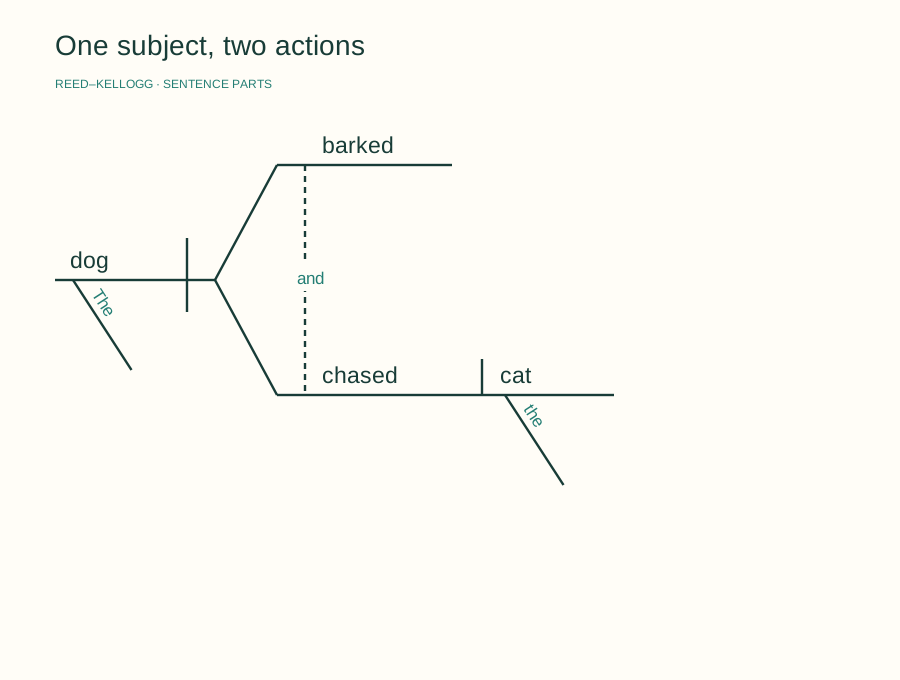
One subject connected to two predicates in a Reed-Kellogg sentence diagram

Tutors: show how one subject takes two predicates

Show how one subject can have two predicates. Change either verb and discuss what stays the same.

EDIT THE RELATIONSHIPS

Create Reed–Kellogg Sentence Diagrams for Grammar Practice

Each field maps to a line in your diagram. Adjust the analysis as you work through the sentence.

Teach the difference between objects and complements

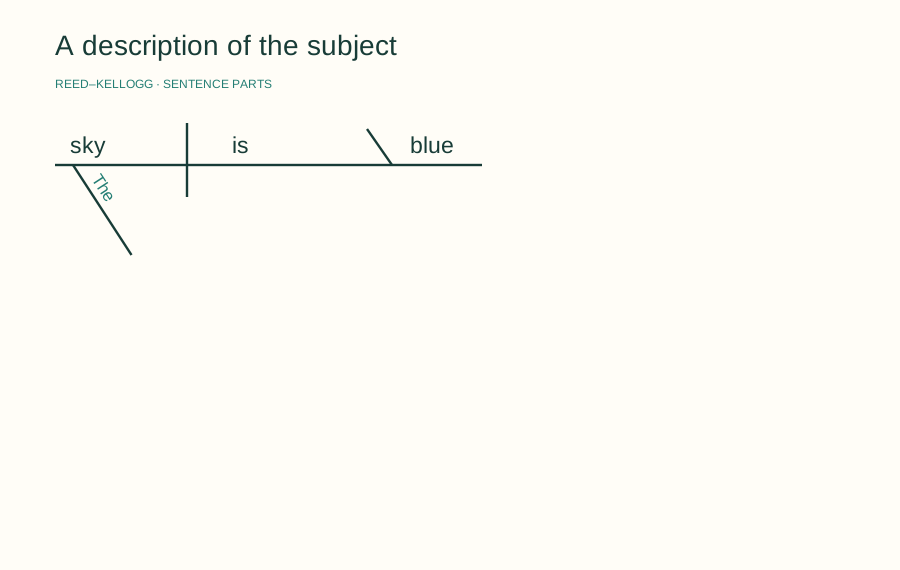
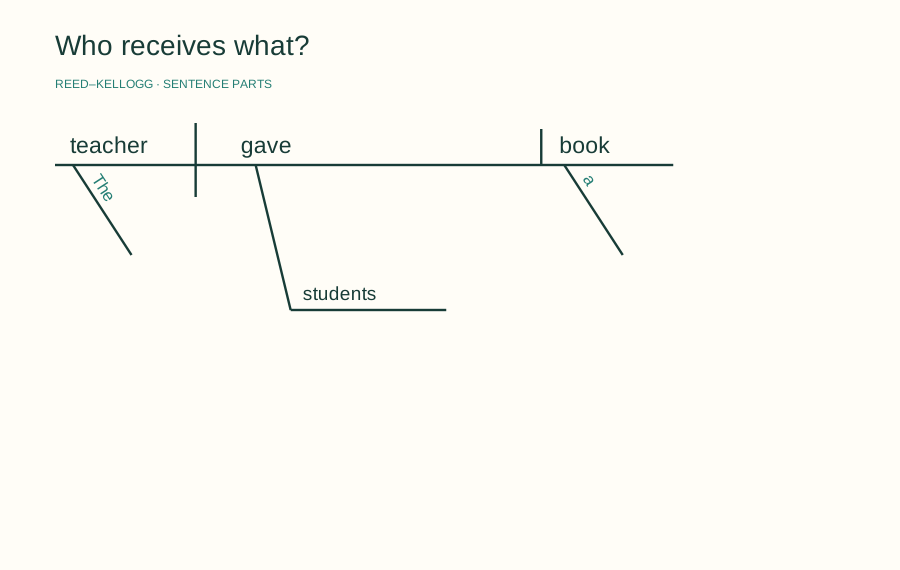
Show students why book follows an action verb in The teacher gave students a book, while blue describes the subject in The sky is blue. Select Action or Linking to draw a vertical or slanted divider.

Try Sentence Diagram Generator
Linking verb diagram showing a slanted divider before the adjective blue

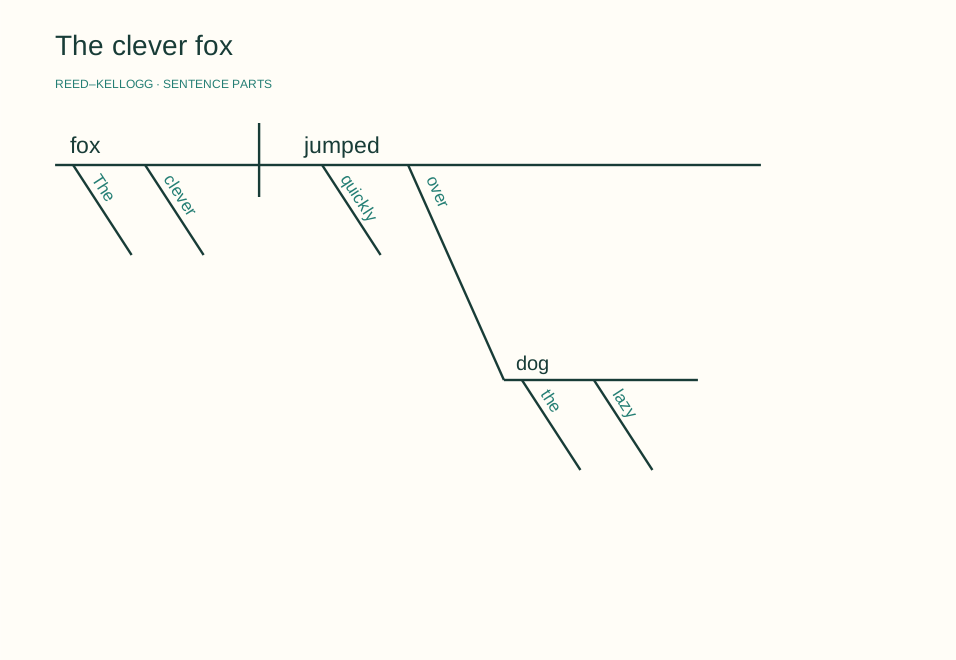
Explain which word a prepositional phrase modifies

Attach a phrase to the subject, a verb, or an existing object or complement, then move it to discuss other readings. Add up to four phrases. The editor follows the analysis you choose.

Try Sentence Diagram Generator
Prepositional phrase over the lazy dog attached to the verb jumped

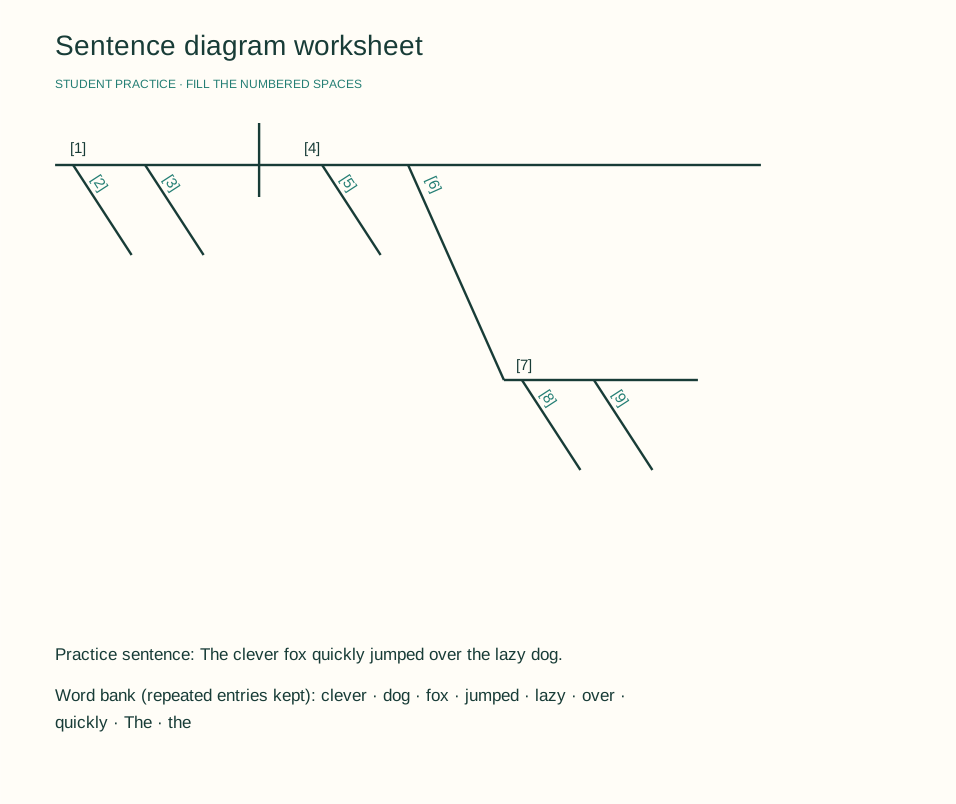
Create a student worksheet and matching teacher answer key

Switch one diagram between a completed answer key and a student worksheet with numbered spaces. Every line and attachment stays in place. Add an alphabetical word bank if you want one, and export either version as SVG or PNG. Repeated entries stay in the bank, and the answer key lists answers by matching number. If you enter the original sentence, it becomes the exercise prompt.

Try Sentence Diagram Generator
Student Reed-Kellogg worksheet with numbered spaces, a practice sentence, and an alphabetical word bank
CHECK BEFORE YOU SHARE

Check Sentence Parts and Word Coverage Before Export

A readable diagram starts with a complete structure. The built-in checks help you review your input, and you make the grammar calls.

Complete the required fields

Missing subjects, verbs, linking-verb complements, incomplete phrases, and unavailable attachment targets are flagged before export.

Compare every word

Optionally enter the original sentence. Word coverage lists missing words and extra occurrences, so repeated words are checked individually.

Review the analysis yourself

A complete word list does not prove the roles are correct. Check the subject, object, and modifier relationships against your lesson or grammar reference.

Sentence diagram whose modifiers and phrase can be checked against the original sentence
Check the words, then check what each word does.STRUCTURE + WORD COVERAGE

LESS REDRAWING, MORE REASONING

Edit Your Online Sentence Diagram Without Redrawing

Work through the grammar with a diagram that stays easy to revise and share.

Live preview

Move a phrase without starting over

Change its attachment target and the diagram updates immediately.

Browser-based

Keep your sentences local

The generator renders and exports in your browser. It does not send your sentence to a parsing service.

Two export formats

Take the result into class

Save an SVG for further editing or a PNG for your existing teaching materials.

FROM WORDS TO LINES

How to Use the Sentence Diagram Generator

Start with an example or clear the fields to build your own analysis.

01

Enter the subject and verb

Type the simple subject and main verb. Put articles, adjectives, and adverbs into the matching modifier field, separated by commas.

02

Choose a verb type and add objects

Select Action or Linking. For an action verb, add a direct object and an optional indirect object. For a linking verb, add a predicate noun or adjective.

03

Add phrases and check your words

Add any supported prepositional phrases and choose what each one modifies. Optionally paste the original sentence to find words you have not assigned.

04

Download your sentence diagram

Review the grammar and fix any incomplete fields. Choose Teacher answer key or Student worksheet, turn the optional word bank on for practice, and download the selected version as SVG or PNG.

Use Sentence Diagram Generator Now
Student worksheet created with PaperBanana Sentence Diagram Generator, ready to export with numbered spaces and a word bank
Select Student worksheet, export it, then switch to Teacher answer key for the matching solution.

MORE WAYS TO ORGANIZE LANGUAGE

Looking for a Syntactic Tree or a Classroom Organizer?

A Reed–Kellogg diagram shows grammatical functions. A syntactic tree shows phrase hierarchy. Choose the format your assignment asks for.

View All Tools
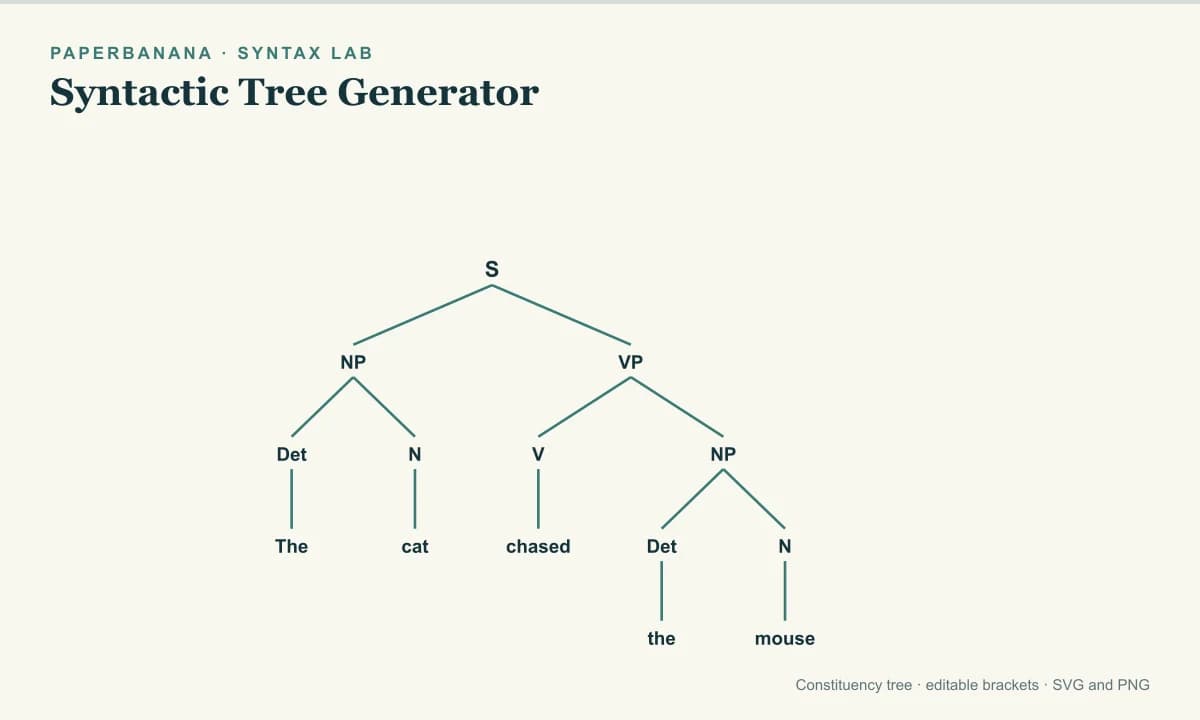
A constituency tree with phrase labels and word leaves

Syntactic Tree Generator

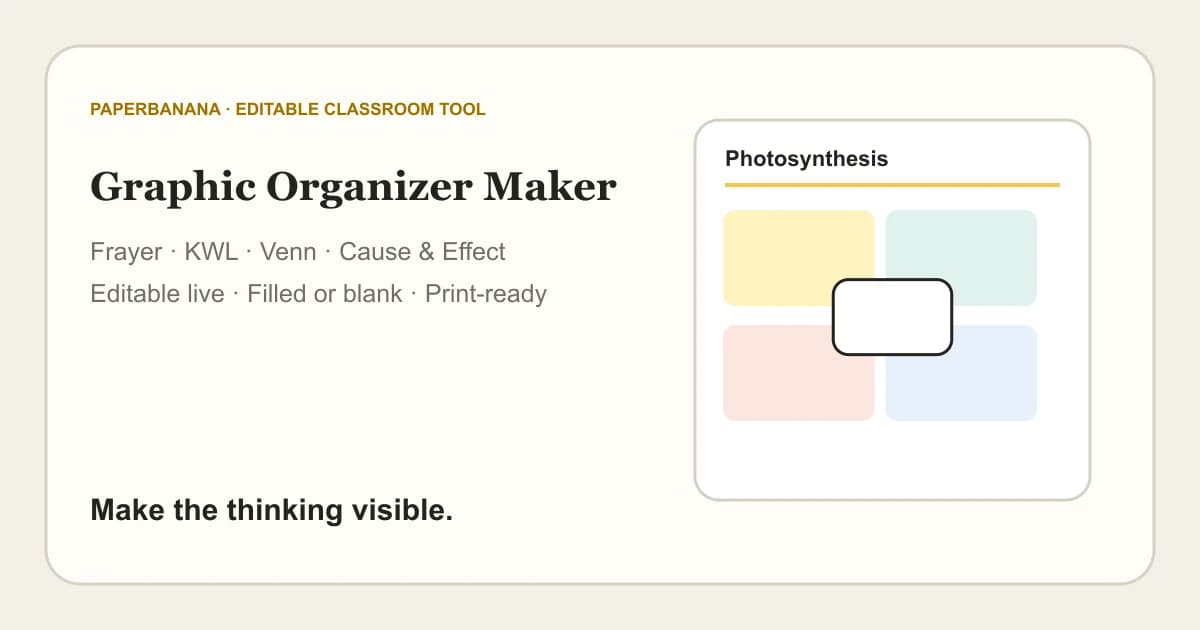
A classroom graphic organizer

Graphic Organizer Maker

A Venn diagram showing overlapping groups

Venn Diagram Maker

Image format conversion tool

Image Format Converter

COMMON QUESTIONS

Sentence Diagram Generator FAQ

How to make a sentence diagram online with no signup?+

Open an example or type your own sentence parts into the fields, and the Reed–Kellogg diagram updates as you edit. Word coverage checks, student worksheets, teacher answer keys, and SVG or PNG downloads need no account. Exports carry no watermark, and rendering runs in your browser.

How to diagram a sentence step by step with this tool?+

Enter the subject, verbs, objects or complements, and modifiers in their fields. The tool arranges the Reed–Kellogg lines automatically, but it does not parse sentences or choose grammatical roles for you. Start from an example, revise the parts, and review your analysis before you download.

Sentence diagram vs. syntax tree: which one do I need?+

Use a Reed–Kellogg diagram to show grammatical functions and a syntax tree to show phrase hierarchy. The diagram arranges words as subject, verb, object, complement, and modifier. A constituency tree uses branches such as S, NP, and VP. For a tree, open the Syntactic Tree Generator above.

What sentence patterns does this English sentence diagram generator support?+

It supports one simple subject, one or two predicates, action or linking verbs, objects or subject complements, modifiers, and up to four prepositional phrases. Embedded clauses, compound subjects, questions, and infinitives are not supported. Two predicates sharing one subject are not the same as a compound sentence with independent clauses.

How to attach a prepositional phrase in a sentence diagram?+

Enter the preposition and its object, then pick a subject, verb, or existing object or complement in the Modifies menu. The diagram connects the phrase to that part. Choose the attachment that fits your sentence’s meaning. Some sentences allow more than one reading, and the editor does not pick for you.

How to diagram direct objects and subject complements?+

Choose Action for a direct object, such as book in The teacher gave students a book. Choose Linking for a subject complement, such as blue in The sky is blue. The generator draws a vertical divider for an object and a backward-slanting divider for a complement.

How does word coverage find missing words in a sentence diagram?+

Word coverage compares your optional original sentence with your diagram fields. It counts repeated words individually and flags words not assigned and extra occurrences, ignoring punctuation and capitalization. A matching count does not prove the grammar is correct, so review the roles and phrase attachments yourself before sharing.

How to create sentence diagram worksheets with answer keys?+

Choose Student worksheet to get numbered spaces, with an optional alphabetical word bank. Repeated entries stay in the bank, and an original sentence becomes the exercise prompt. Download SVG or PNG, then switch to Teacher answer key for matching numbered answers. Both versions come from your input and are not checked for grammar.

MAKE THE CONNECTIONS CLEAR

Build Your Sentence Diagram

Choose a pattern, edit the parts, and turn your analysis into a clear Reed–Kellogg diagram.

Try Sentence Diagram Generator Now