• Logo
    PaperBananaAI Academic Illustration Generator
Home
  • Home
  • Studio
  • Scientific Illustration Generator
  • Poster Maker
  • Diagram Maker
  • Figure Editor
  • Pricing
My Creations
  • My Creations
  • Invite Friends
LogoPaperBanana
HomePromptsBlogPricingInvite Friends
  1. Home
  2. Tools
  3. Syntactic Tree Generator
PaperBanana

PaperBanana - AI-powered academic illustration generator

support@paperbanana.me
All Tools

Tool directory

AI Figure Tools

  • Scientific Illustration
  • Graphical Abstract Maker
  • Scientific Poster Maker
  • Scientific Diagram Maker
  • Scientific Figure Editor
  • Prompts

Research Diagrams

  • Conceptual Framework Generator
  • Neural Network Diagram Generator
  • PRISMA Flow Diagram Generator
  • CONSORT Flow Diagram Generator

Graphic Organizers

  • Graphic Organizer Maker
  • Frayer Model Maker
  • KWL Chart Maker
  • Cause and Effect Graphic Organizer
  • Compare and Contrast Graphic Organizer
  • Spider Diagram Maker
  • Plot Diagram Maker
  • Syntactic Tree Generator
  • Sentence Diagram Generator
  • Punnett Square Maker
  • Venn Diagram Maker

Math & Physics

  • Factor Tree Generator
  • Number Line Generator
  • Force Diagram Maker
  • Bohr Model Maker

Data Visualization

  • Sankey Diagram Generator
  • Scatter Plot Maker
  • Dot Plot Maker
  • Forest Plot Maker
  • Funnel Plot Maker
  • Kaplan-Meier Curve Maker
  • Box Plot Maker
  • Heatmap Generator
  • Volcano Plot Generator
  • Phylogenetic Tree Generator

Image & Submission

  • Journal Figure Checker
  • Image Format Converter

© 2026 PaperBanana. All Rights Reserved.

Support

  • About
  • Blog
  • Pricing
  • Contact

Legal

  • Privacy Policy
  • Terms of Service
  • Acceptable Use
Syntax tree maker for linguistics

Syntactic Tree Generator: Draw Trees from Sentences or Brackets

This online Syntactic Tree Generator is ready to use. Type a short English sentence to get a constituency tree draft, or enter labeled brackets to draw your own analysis. Compare two PP attachments, edit the branches, and export SVG or PNG with no signup.

Syntax tree from a sentenceTwo PP attachment readingsPrecise bracket editorSVG and PNG export, no signup

Live syntactic tree generator

Create a Syntactic Tree Diagram

Sentence drafts cover short English subject-verb-object and intransitive sentences with basic prepositional phrases. If an object noun phrase is followed by a final PP, compare both attachment readings below. Always check the result against your course rules.

Your text and tree stay in this browser. Downloads need no account or watermark.

Live preview

Live syntax tree

14 nodes · 5 terminal words
TheDetcatNNPchasedVtheDetmouseNNPVPS

Need a scientific illustration for your paper?

Turn your research methods, mechanisms, and workflows into clear figures with paper banana.

Syntax tree basics

What Is a Syntax Tree?

A syntactic tree, also called a syntax tree or phrase-structure tree, shows how a sentence is built. The words sit at the leaves, and labels such as S, NP, VP and PP show which words group into phrases. Linguistics students draw these trees to make claims about constituency and attachment visible.

Sentence mode builds a transparent draft for common short English patterns. When a sentence has a verb, an object NP and a final PP, it also shows two possible PP attachments so you can compare them. It is not a full natural-language parser. Unfamiliar verbs, questions, embedded clauses and other ambiguities still need your judgment. Switch to bracket mode to enter the structure your assignment requires.

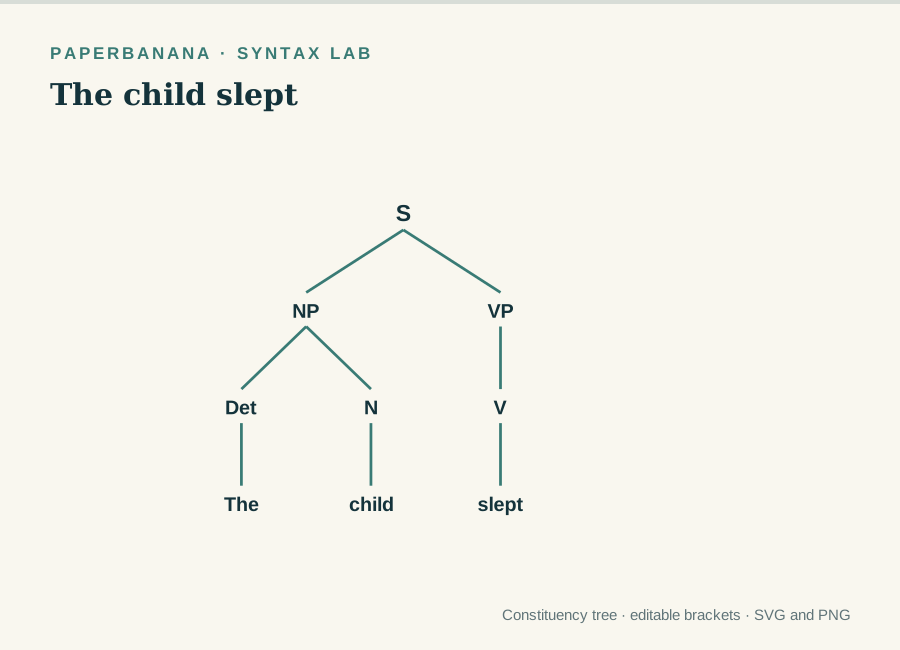
Bracket notation gives you full control over labels and grouping. For example, [S [NP [Det The] [N cat]] [VP [V slept]]] makes an S node with an NP child and a VP child. The preview, copied brackets and exported image always show the same tree.

01

Terminal words

The words of the sentence sit at the ends of the branches.

02

Phrase labels

NP, VP, PP and your own labels mark each constituent.

03

Hierarchy

Parent and child nodes show how words group into phrases.

04

Attachment

Move a PP or another phrase to show a different reading.

Syntax Tree Examples You Can Edit

Open a sample, inspect its labels and change the sentence or brackets to match your analysis.

For linguistics work

Syntactic Tree Diagrams for Coursework and Teaching

Use a legible phrase-structure diagram wherever the analysis must be checked by another reader.

Linguistics study desk with abstract branching syntax tree sketch

Syntax Tree Homework for Linguistics Students

Draft a tree for a short sentence, fix its constituents in bracket mode and export a clean figure to hand in.

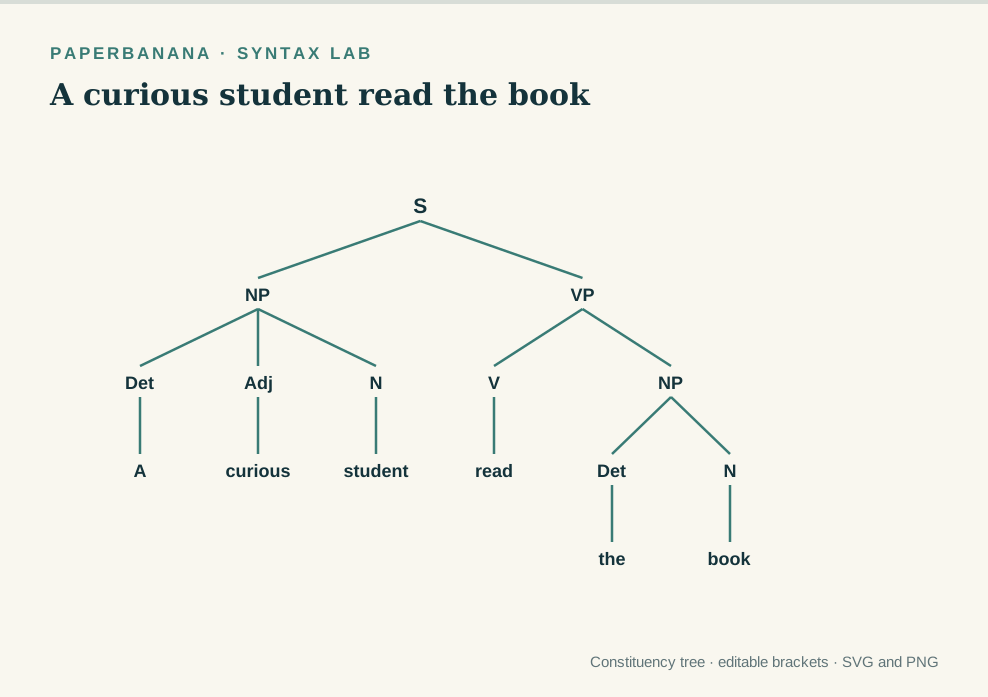
Editable syntax tree showing adjective inside a noun phrase

Syntax Tree Examples for Slides and Worksheets

Build consistent NP and VP examples for lessons on constituency, phrase structure and parts of speech.

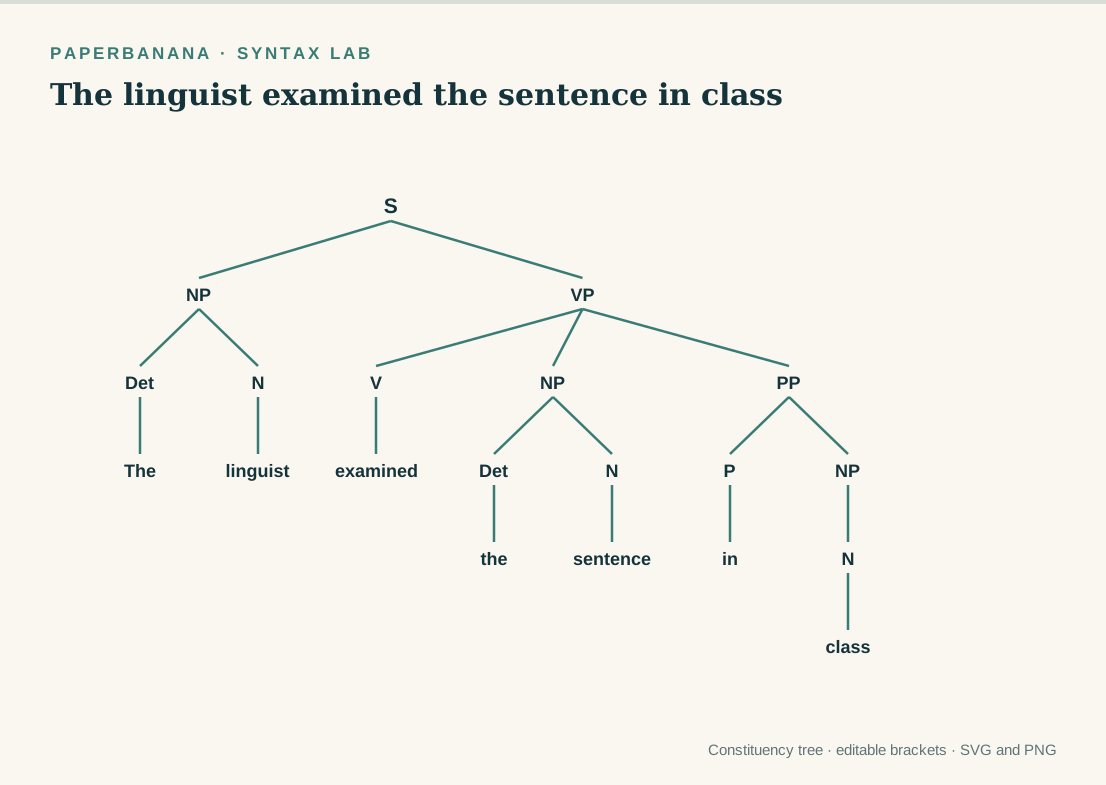
Syntactic tree with a prepositional phrase attached to VP

Explain PP Attachment in Class

Show VP and object-NP attachment side by side, then pick and refine the reading you want students to see.

Syntactic tree generator features

Syntax Tree Generator from Sentence or Brackets

Sentence mode drafts a simple English constituency tree. Bracket mode lets you revise every phrase boundary and node label before you export.

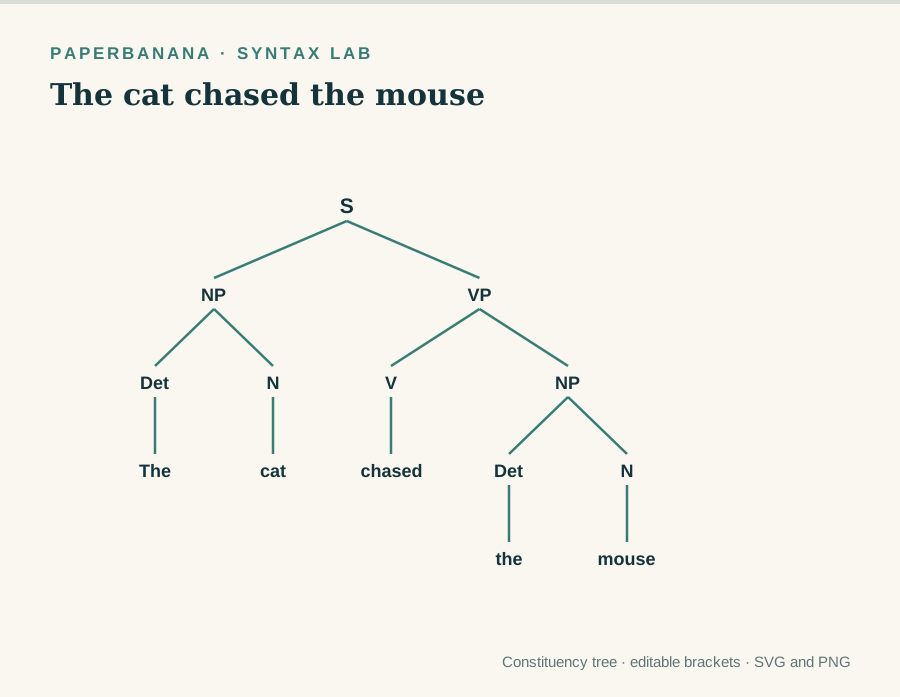
Get a first-draft tree from a short sentence

Type a common subject-verb-object or intransitive sentence and get a constituency tree you can inspect branch by branch.

Generate a Syntactic Tree Now
Syntactic tree generated from the sentence The cat chased the mouse

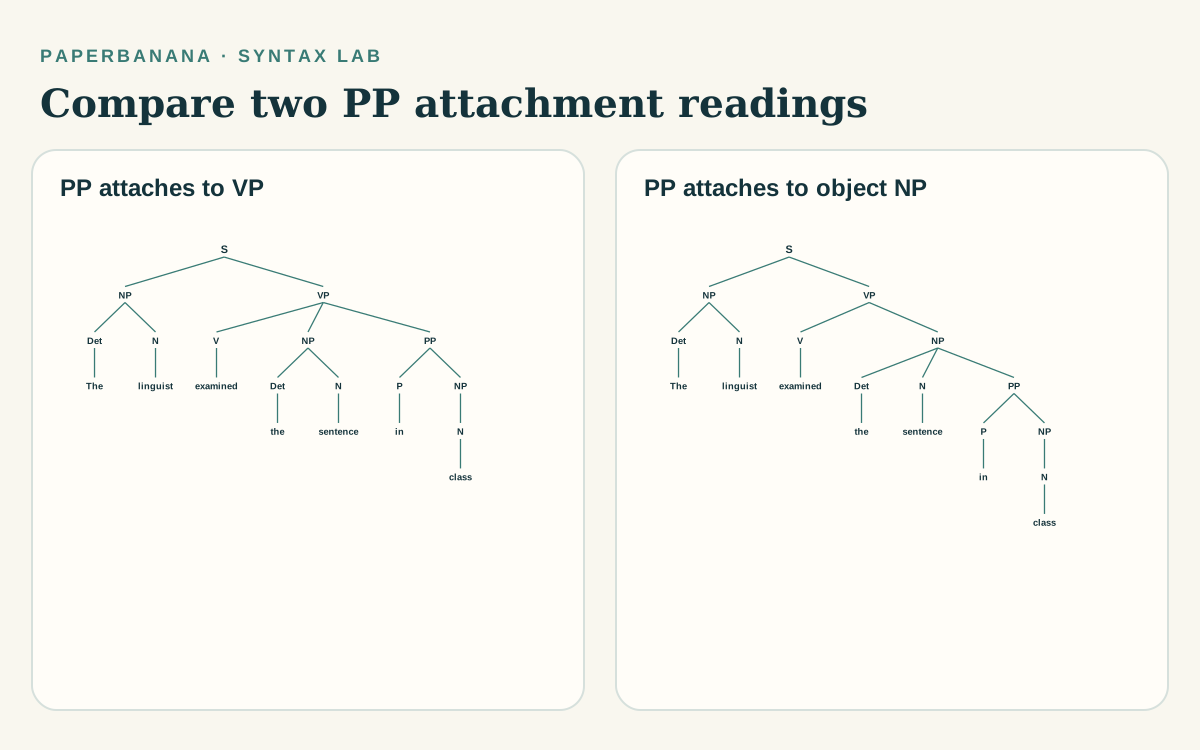
Compare two PP attachment trees side by side

When a short sentence has an object NP and a final PP, see the VP and object-NP attachments together. Pick one and the live tree, brackets and exports all update.

Generate a Syntactic Tree Now
Side-by-side syntax trees showing a final PP attached to VP or to the object noun phrase

Edit labeled brackets and custom labels

Paste or revise nested [Label ...] structures, including course-specific labels and X-bar projections you define yourself.

Generate a Syntactic Tree Now
Editable syntax tree with a PP attachment and custom phrase labels

Copy the brackets or download SVG and PNG

Copy the bracket analysis, or export the same tree as a sharp SVG or a high-resolution PNG for papers and slides.

Generate a Syntactic Tree Now
Minimal syntax tree example ready for vector export
Check the analysis

Check Labels and PP Attachment Before You Export

The diagram shows the analysis you entered. Whether it is grammatically correct still depends on your sentence and the framework you follow.

Check every word

Make sure the terminal words match your sentence and none were dropped.

Check every constituent

Compare the NP, VP and PP grouping with the tests or rules from your course.

Resolve ambiguity yourself

For a supported object-plus-PP sentence, compare the VP and object-NP attachments and choose the reading you mean. Other ambiguities need manual bracket editing.

Editable phrase-structure tree showing VP and PP attachment in the syntactic tree generator
Sentence mode drafts simple patterns. Bracket mode draws exactly the structure you enter.Inspect before submitting

Why use this tool

Why Use This Online Syntax Tree Maker

Go from a readable draft to a diagram you can defend in class.

Quick Start

Start without notation

Type a short sentence and get a first-pass tree right away.

Editable

Keep full control

Change labels and nesting in brackets to match your course’s analysis.

Side by Side

See two PP readings together

Compare a final PP attached to the VP or to the object NP, then keep the analysis you intend.

Clear Layout

Read every branch easily

Even spacing and high-contrast labels keep the tree legible.

Two Formats

Export for documents

Save SVG or PNG for slides, notes and worksheets.

Private

Work in your browser

No login, upload or watermark is needed to make a tree.

Four steps

How to Use the Syntactic Tree Generator

Pick the input that matches how much of the analysis you already know.

01

Enter a sentence or brackets

Use sentence mode for a short English declarative sentence, or bracket mode when you already know the phrase structure.

02

Inspect the live tree

Read S, NP, VP and the terminal words from top to bottom. Look closely at labels and PP attachment.

03

Compare or revise the analysis

If the PP attachment comparison appears, review both candidate trees and select a reading. Use bracket mode for any other change.

04

Copy or export the tree

Copy the bracket notation, or download SVG or PNG for your notes, slides or assignment.

Generate Syntactic Tree Online
Academic desk with a hand-drawn syntax tree sketch, showing how to use the syntactic tree generator
Sentence mode covers common simple patterns. Bracket mode is the precise editing path.

More academic diagrams

More Tools for Syntax Lessons and Handouts

Pair your syntax tree with related visual tools for explanations and handouts.

View All Tools
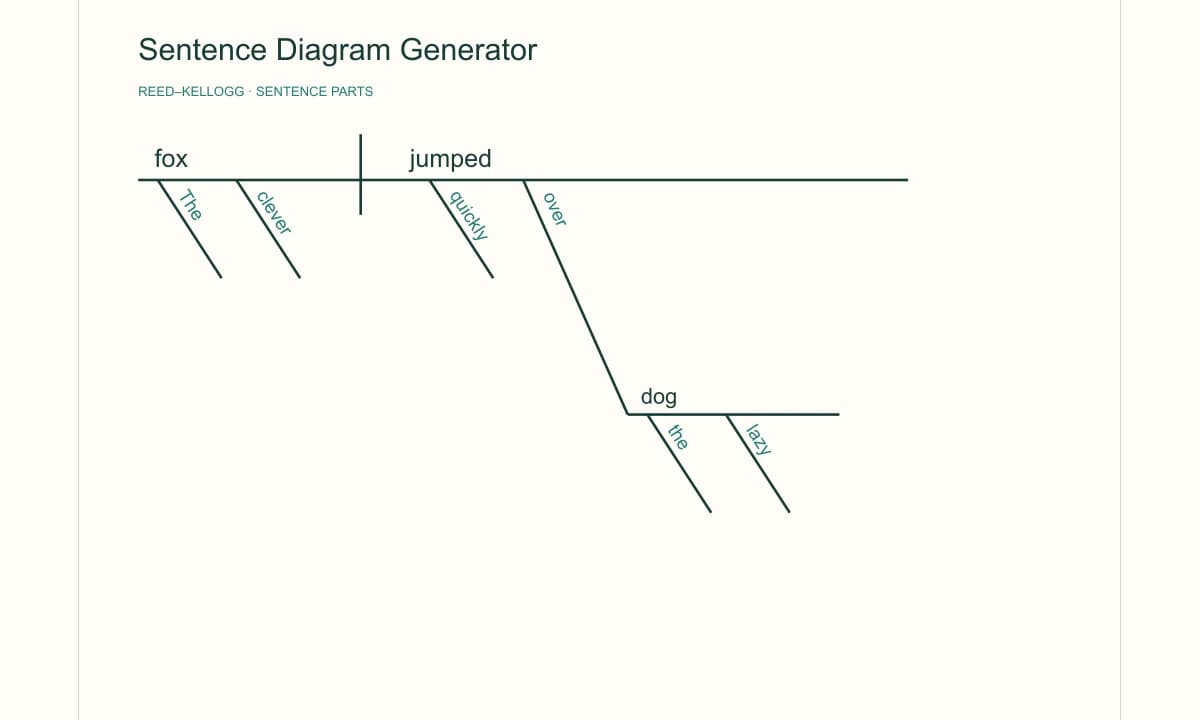
Reed–Kellogg sentence diagram showing a subject, verb, object, and modifiers

Sentence Diagram Generator

Graphic organizer preview

Graphic Organizer Maker

Venn diagram preview

Venn Diagram Maker

Image converter preview

Image Format Converter

Common questions

Syntactic Tree Generator FAQ

How to use a syntax tree generator from a sentence?+

Type a short English declarative sentence, such as “The cat chased the mouse,” in Sentence draft. The tool groups supported words into a basic S, NP and VP constituency tree. Check the labels and phrase boundaries, then switch to bracket mode if your assignment needs a different analysis.

How to edit a syntactic tree diagram before exporting it?+

Open Labeled brackets and revise nested groups such as [S [NP [Det The] [N cat]] [VP [V slept]]]. The live diagram follows your grouping and labels, including custom ones. The editor flags malformed brackets so you can fix them before copying the notation or downloading an image.

Can an online syntactic tree generator show X-bar and movement?+

Bracket mode draws X-bar projections, movement traces and course-specific labels exactly as you enter them, so you place and label traces manually. Sentence mode makes only a basic constituency tree. It does not infer X-bar structure, movement or Minimalist analyses.

How does this syntax tree maker compare PP attachments?+

For a supported sentence with a verb, an object noun phrase and a final prepositional phrase, it shows two candidate trees side by side: the PP attached to the VP, or inside the object NP. Choose one to update the preview, brackets and export. Other ambiguities, questions and embedded clauses need manual editing.

What is a syntax tree, and how is it different from an AST?+

A linguistics syntax tree shows how words form phrases such as NP, VP and PP in a sentence. A programming abstract syntax tree (AST) represents the structure of source code. This generator draws linguistic constituency analyses and is not designed for programming languages.

Which image formats can I export for syntax tree homework?+

SVG and PNG. SVG keeps branches and text sharp when you resize it for a paper or worksheet, while PNG is convenient for slides and documents. Both include your selected PP attachment and edited labels, with no account or watermark.

How to use a syntactic tree generator online with no signup?+

Open this page, then type a supported short sentence or enter labeled brackets. Compare two PP attachment readings when available, copy the notation and download SVG or PNG. Everything runs in your browser with no account or watermark, but you still need to check the grammar yourself.

How to check whether my syntax tree is correct?+

Check that every word appears once, NP and VP branches group the intended constituents, labels follow your course conventions, and ambiguous phrases attach where your reading requires. The tool validates bracket structure, but it cannot verify your linguistic analysis or your course’s rules.

Start with a sentence

Make a Syntactic Tree You Can Revise

Draft a short sentence, compare PP attachments when available, refine the brackets and export a clear diagram. No signup needed.

Try Syntactic Tree Generator Now