• Logo
    PaperBananaAI Academic Illustration Generator
Home
  • Home
  • Studio
  • Scientific Illustration Generator
  • Poster Maker
  • Diagram Maker
  • Figure Editor
  • Pricing
My Creations
  • My Creations
  • Invite Friends
LogoPaperBanana
HomePromptsBlogPricingInvite Friends
  1. Home
  2. Tools
  3. Data Visualization
  4. Bell Curve Generator
PaperBanana

PaperBanana - AI-powered academic illustration generator

support@paperbanana.me
All Tools

Tool directory

AI Figure Tools

  • Scientific Illustration
  • Graphical Abstract Maker
  • Scientific Poster Maker
  • Scientific Diagram Maker
  • Scientific Figure Editor
  • Prompts

Research Diagrams

  • Conceptual Framework Generator
  • Neural Network Diagram Generator
  • PRISMA Flow Diagram Generator
  • CONSORT Flow Diagram Generator

Graphic Organizers

  • Graphic Organizer Maker
  • Frayer Model Maker
  • KWL Chart Maker
  • Cause and Effect Graphic Organizer
  • Compare and Contrast Graphic Organizer
  • Spider Diagram Maker
  • Plot Diagram Maker
  • Syntactic Tree Generator
  • Sentence Diagram Generator
  • Punnett Square Maker
  • Venn Diagram Maker

Math & Physics

  • Factor Tree Generator
  • Number Line Generator
  • Force Diagram Maker
  • Bohr Model Maker

Data Visualization

  • Bell Curve Generator
  • Histogram Maker
  • Waterfall Chart Generator
  • Scientific Color Palette Generator
  • Sankey Diagram Generator
  • Scatter Plot Maker
  • Dot Plot Maker
  • Forest Plot Maker
  • Funnel Plot Maker
  • Kaplan-Meier Curve Maker
  • Box Plot Maker
  • Heatmap Generator
  • Volcano Plot Generator
  • Phylogenetic Tree Generator

Image & Submission

  • Journal Figure Checker
  • Image Format Converter

© 2026 PaperBanana. All Rights Reserved.

Support

  • About
  • Blog
  • Pricing
  • Contact

Legal

  • Privacy Policy
  • Terms of Service
  • Acceptable Use

From a mean and spread to a clear distribution

Free Bell Curve Generator

Use the Bell Curve Generator to plot a normal distribution from mean and standard deviation or your data. Shade probabilities, find percentile cutoffs, and export the chart with its calculations.

  • ✓No signup or watermark
  • ✓Mean & SD or raw data
  • ✓Probability shading & cutoffs
  • ✓PNG, SVG & calculation CSV

Build your bell curve

Customize & compare

Calculations run in your browser. This tool does not upload your numeric inputs.

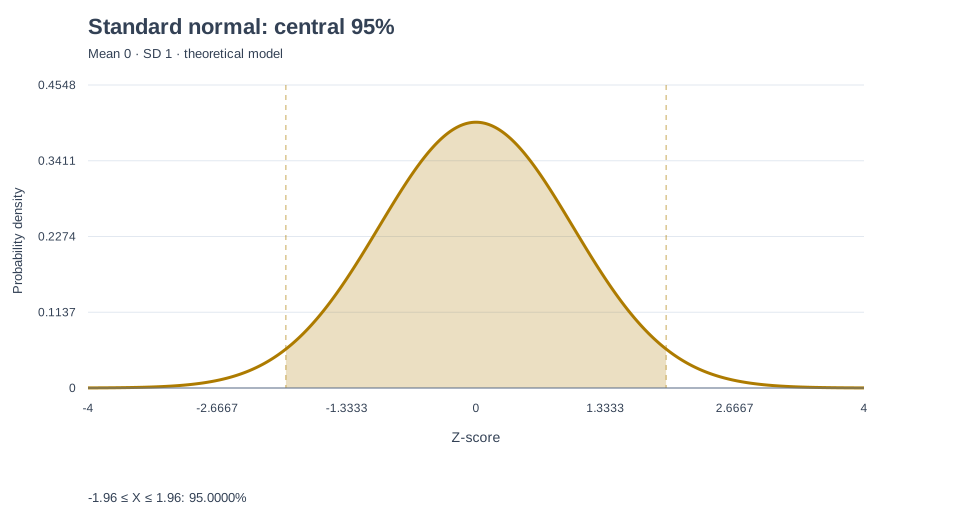
Standard normal distribution. -1.96 ≤ X ≤ 1.96. Normal-model probability 95.0000%.

Normal-model probability

95.0000%

Mean / SD

0 / 1

Selected region

-1.96 ≤ X ≤ 1.96

Free · no watermark

CSV exports use stable English field names and decimal points for spreadsheet compatibility.

Percentile table & data comparison

Normal-model cutoffs use X = μ + σΦ⁻¹(p). Choose From data to compare these theoretical cutoffs with observed percentiles. All rows are included in Calculation CSV.

Normal-model and observed percentile cutoffs
PercentileZ-scoreNormal model
5%-1.6449-1.6449
25%-0.6745-0.6745
50%00
75%0.67450.6745
95%1.64491.6449

This comparison is descriptive, not a normality test. With tied values, the fraction at or below an observed percentile can differ from its nominal percentage.

How to read this result

To solve a percentile p, use z = Φ⁻¹(p), then X = μ + σz. For an upper-tail area p, use −Φ⁻¹(p). For central coverage c, use the percentiles (1 − c)/2 and (1 + c)/2. Percentages are divided by 100 before calculation.

Convert each boundary with z = (x − μ) / σ. For an interval, the model probability is Φ(z upper) − Φ(z lower); for outside shading, add the two tails. Φ is the standard normal cumulative distribution function.

The vertical axis is probability density, not probability. The area under the curve is 1. The chart displays approximately ±4 SD and expands to include solved cutoffs; probabilities include the full tails beyond the visible range.

Central 95% uses ±1.95996 SD. Within 2 SD covers about 95.45%. The observed histogram uses density scaling so its area is 1; sample proportions need not match model probabilities. Comparison shading always refers to the primary curve.

The histogram uses the square root of the observation count, rounded up, with at most 30 bins. Its bins cover the observed minimum to maximum. Model-expected bin counts may sum to less than the sample size because the normal model also assigns probability outside that range.

Need a scientific illustration for your paper?

Turn your research methods, mechanisms, and workflows into clear figures with paper banana.

Understand the shape and the area

Understand the Bell Curve Formula and Normal Distribution

A bell curve is the symmetric shape of a normal distribution. Its mean sets the center, while its standard deviation controls the spread. Use this normal distribution generator to draw that model and calculate the probability of values falling in a selected region.

The bell curve formula is f(x) = exp(−(x − μ)² / (2σ²)) / (σ√(2π)), where μ is the mean and σ is a positive standard deviation. This gives probability density at x. Probability comes from the area over an interval, not the height of the curve at one point.

A smooth bell curve is a mathematical model, not a description every dataset must follow. When you supply observations, compare the density histogram and observed proportions with the fitted normal curve before interpreting the results.

01

Set the center and spread

Enter a mean and a positive standard deviation to define a theoretical normal distribution.

02

Find an area under the curve

Shade below, above, between or outside boundaries in original units or z-scores.

03

Keep the calculation

Export model parameters, region probabilities and data summaries alongside your chart.
Explore Bell Curve Graph Examples You Can Edit

Each example below is calculated by the same engine as the tool. Load one to inspect its inputs, change a boundary or export the result.

A practical visual for your next explanation

Where a Bell Curve Maker Helps

Use a transparent normal model for teaching, exploring measurements and communicating assumptions.

Standard normal distribution for a statistics lesson

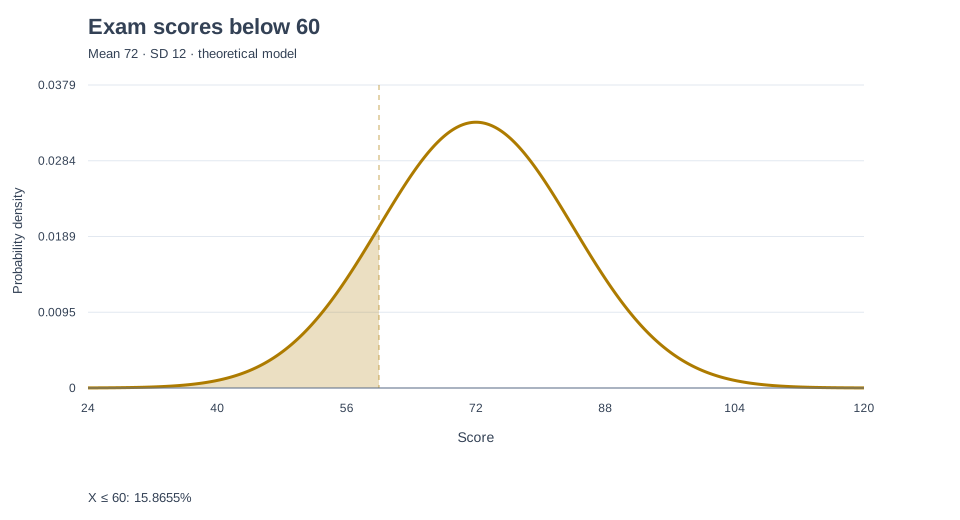
Teach z-scores and the empirical rule

Statistics teachers can show how ±1, ±2 and ±3 SD cover about 68.27%, 95.45% and 99.73% of a normal model. The exact central 95% instead uses approximately ±1.95996 SD.

Score threshold shown on a bell curve

Explain a cutoff in familiar units

Educators can model exam scores and show the proportion below a grade threshold in familiar score units. Compare the modeled result with observed scores before interpreting a class distribution.

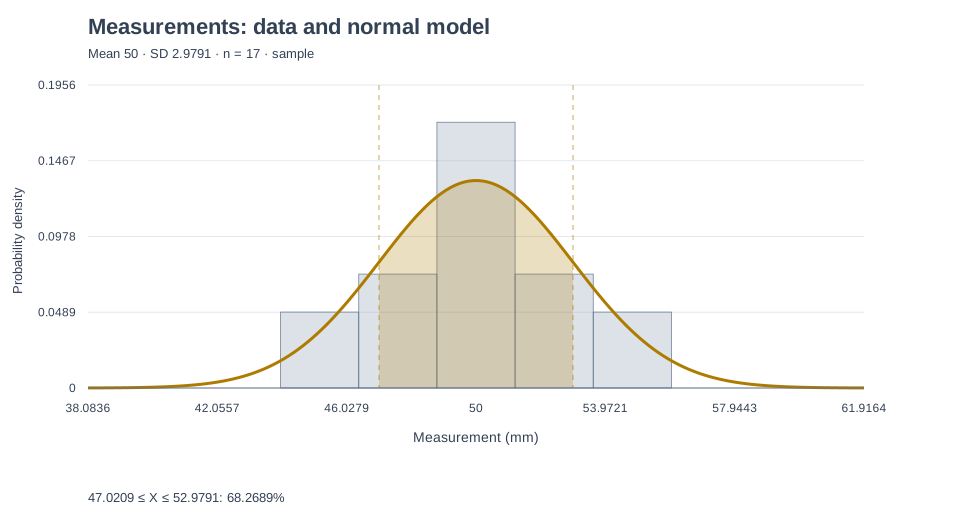
Observed measurements and their fitted normal density

Inspect a fitted distribution

Researchers can paste a measurement column and compare observed density with a fitted normal model. Use sample SD for estimating population variability, or population SD to describe the complete population of interest.

Inputs, probabilities and reusable output

A Gaussian Curve Generator Built for Real Calculations

The graph and exports use the same numeric model, so your picture and its calculations stay aligned.

Explain score thresholds with shaded probabilities

Select left-tail, right-tail, interval or outside regions. Enter original values or z-scores and see the model probability immediately.

Try Bell Curve Generator
Bell curve shaded below a cutoff

Make a bell curve from Excel measurements

Enter μ and σ directly, or paste data from Excel and import CSV, TSV or text. Select a numeric column and choose sample or population standard deviation.

Try Bell Curve Generator
Normal distribution fitted to measurement data

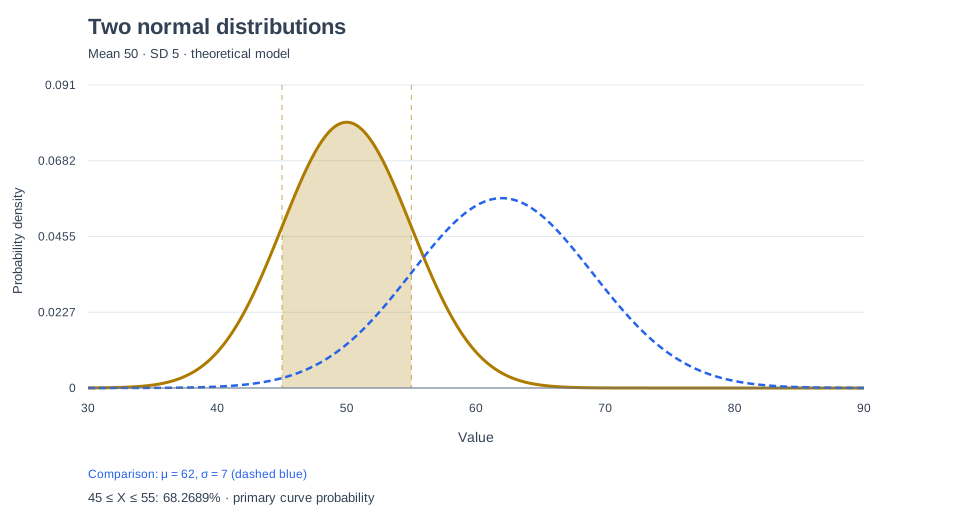
Export charts and calculations for reports

Download a vector SVG, a 1920 × 1040 PNG, or a CSV with parameters, solved boundaries, probabilities and percentile tables. Raw-data exports include observed and modeled percentiles, their differences, and observed versus expected histogram counts.

Try Bell Curve Generator
Two distributions ready for chart export

Go from a target probability to a usable cutoff

Find Percentile Cutoffs and Compare Them with Your Data

Use the Bell Curve Generator in both directions: calculate an area from boundaries, or solve boundaries from a target probability. Keep theoretical cutoffs separate from the percentiles observed in your dataset.

Percentile or upper-tail area

Inverse normal percentile calculator

Choose Find a percentile cutoff and enter 95 to locate the value with 95% of the normal model below it. With mean 100 and SD 15, the cutoff is approximately 124.6728. Choose an upper-tail area of 5% to obtain the same cutoff with the opposite side shaded.

Equal tails, custom coverage

Custom central coverage intervals

Enter a central coverage percentage such as 90 to solve two symmetric boundaries with equal remaining tail areas. With mean 100 and SD 15, central 90% runs from about 75.3272 to 124.6728. This describes modeled individual values; it is not a confidence interval for an estimated mean.

Compare and export

Model versus observed percentile table

Compare the 5th, 25th, 50th, 75th and 95th percentiles and custom solved percentiles. Observed values use Hyndman–Fan type 7 interpolation at index (n − 1)p. Skew, ties and small samples can make them differ from normal-model cutoffs. Interpolated values need not be observations or put exactly p percent below them. Export both sets, differences and the method in CSV.

Make the assumptions visible

Compare Your Histogram with a Fitted Bell Curve

A fitted bell curve can be useful without being a perfect fit. This tool keeps modeled probabilities and observed proportions separate.

Observed versus modeled

For raw data, see how many observations fall inside the selected region alongside the probability predicted by the normal model.

Density on a common scale

Histogram height is count divided by sample size and bin width. Its area is 1, making it comparable to the normal probability density.

Know what the tool does not test

The overlay is exploratory. It does not perform a normality test, establish statistical significance or calculate confidence intervals for an estimated mean.

Observed histogram and normal model shown on the same probability density scale
Calculated from 17 illustrative measurements; the sample SD is used.Data and model

Keep the path from input to figure short

Create a Bell Curve Online without Spreadsheet Setup

Prepare a readable chart while keeping the statistical choices visible.

Browser calculations

Work locally

Numeric inputs are processed in your browser by this tool. No account or server-side calculation is required.

Reusable numbers

Check the arithmetic

Download calculation CSV to inspect parameters, probabilities and observed-versus-expected bin counts.

Free exports

Use the chart elsewhere

Bring SVG into an editor or use PNG in a presentation. Both exports have a white background and no watermark.

Start with a model or your observations

How to Make a Bell Curve from Data or Mean and SD

The preview updates when you edit a valid input. No separate generation request is needed.

01

Enter parameters or paste data

Choose Mean & SD for a theoretical model. Choose From data for a numeric column or CSV, then select the column and SD convention.

02

Choose the region and compare

Select a shading preset, enter boundaries, or choose a percentile, upper-tail area or central coverage to solve a cutoff. Expand Customize & compare to change the title, axis label, color or second curve.

03

Review and export

Check the modeled probability and any observed proportion. Download PNG, SVG or calculation CSV for your next document.

Open Bell Curve Generator
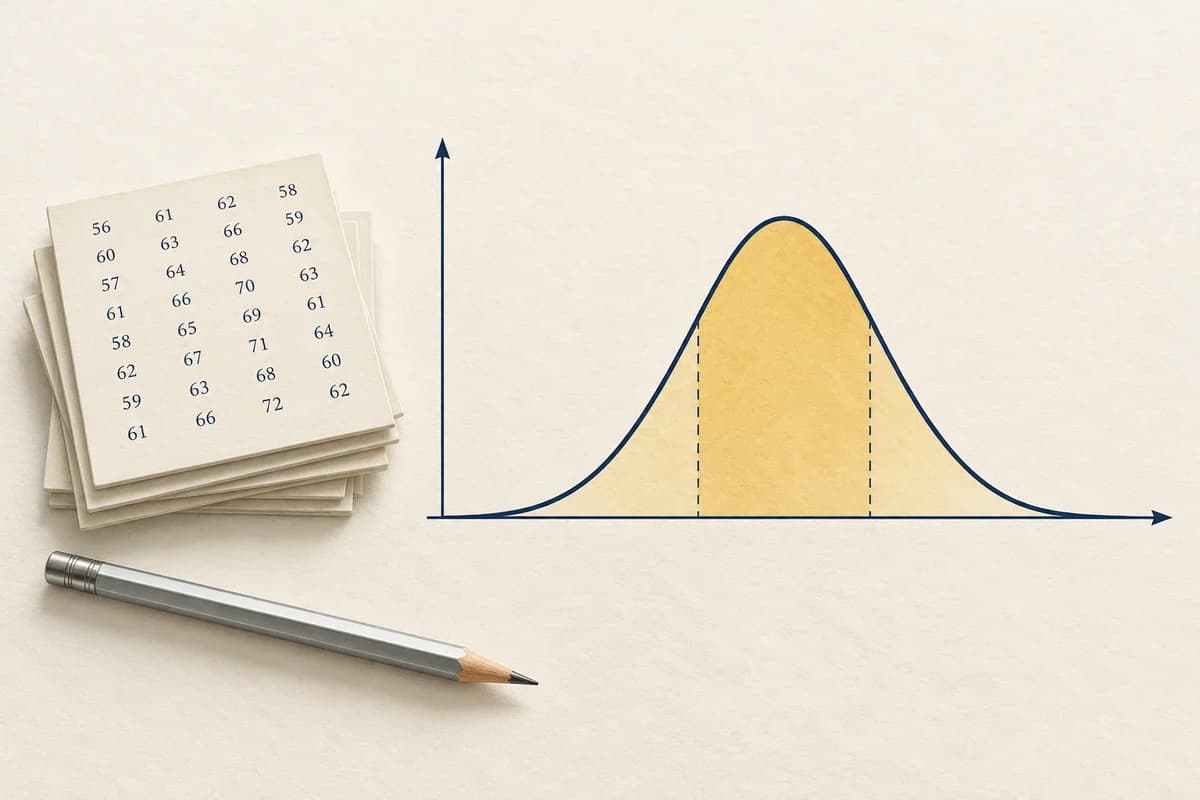
Conceptual illustration of a bell curve on paper with a yellow central region
Conceptual illustration. The interactive chart and example images are generated from numeric calculations.

Explore your distribution further

More Tools for Understanding Numeric Data

Use different views to inspect shape, spread and relationships before choosing a statistical model.

View All Tools
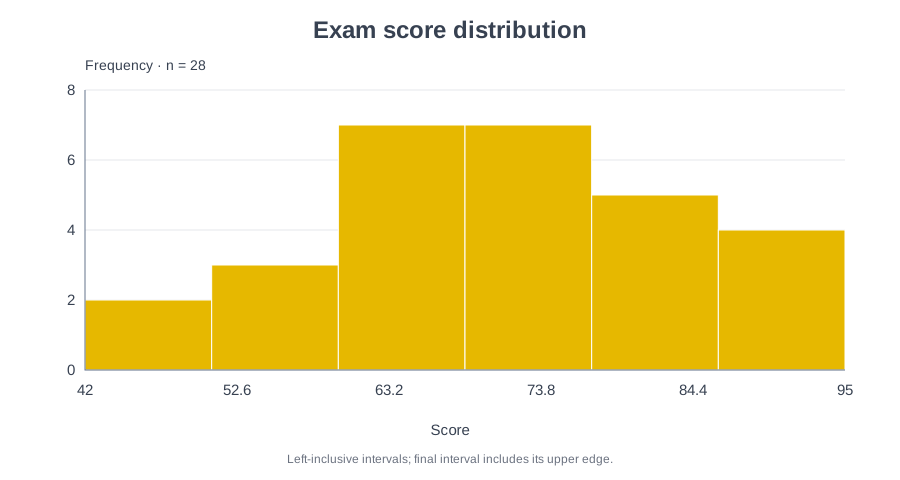
Histogram of exam scores

Histogram Maker

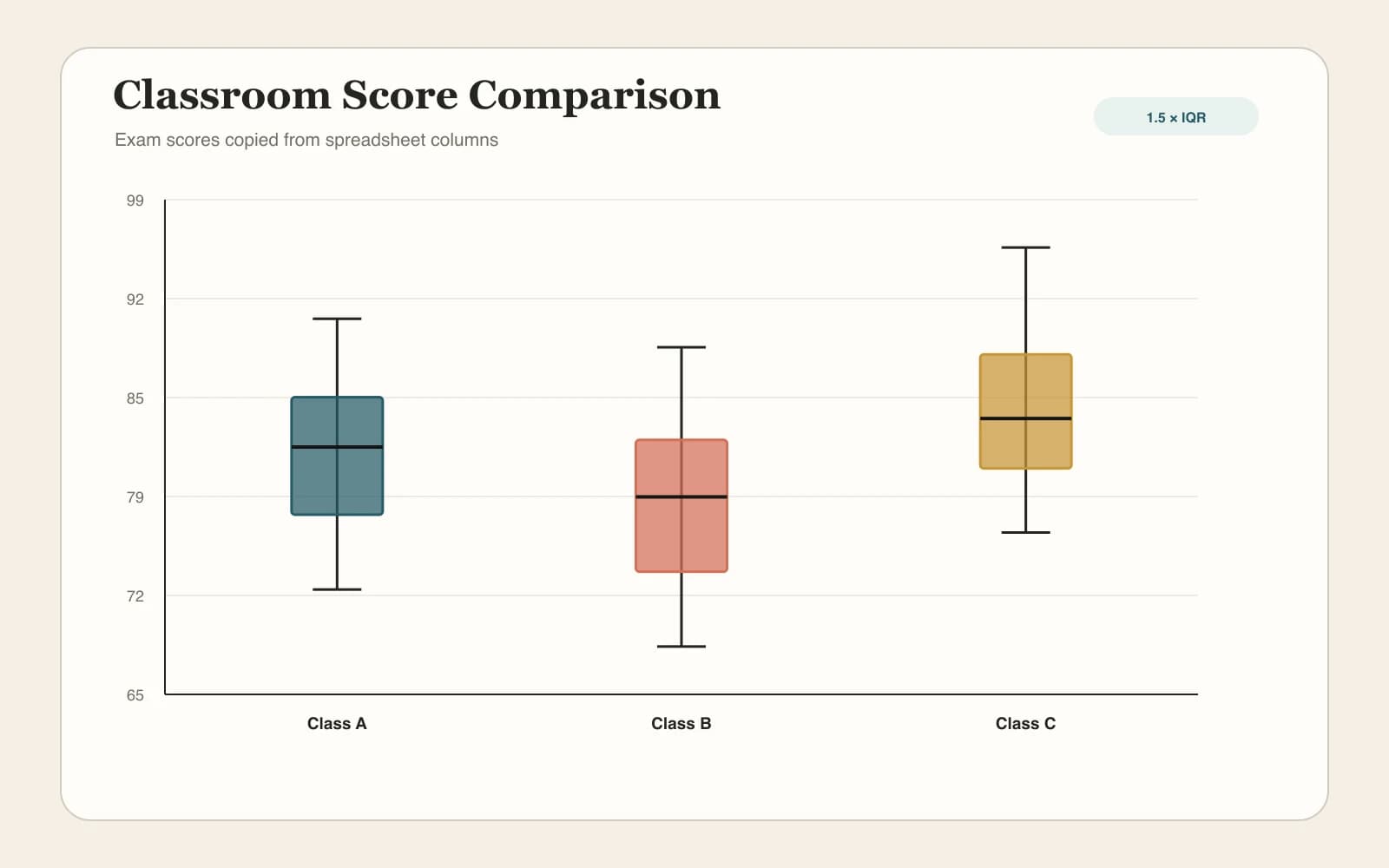
Box plot of classroom scores

Box Plot Maker

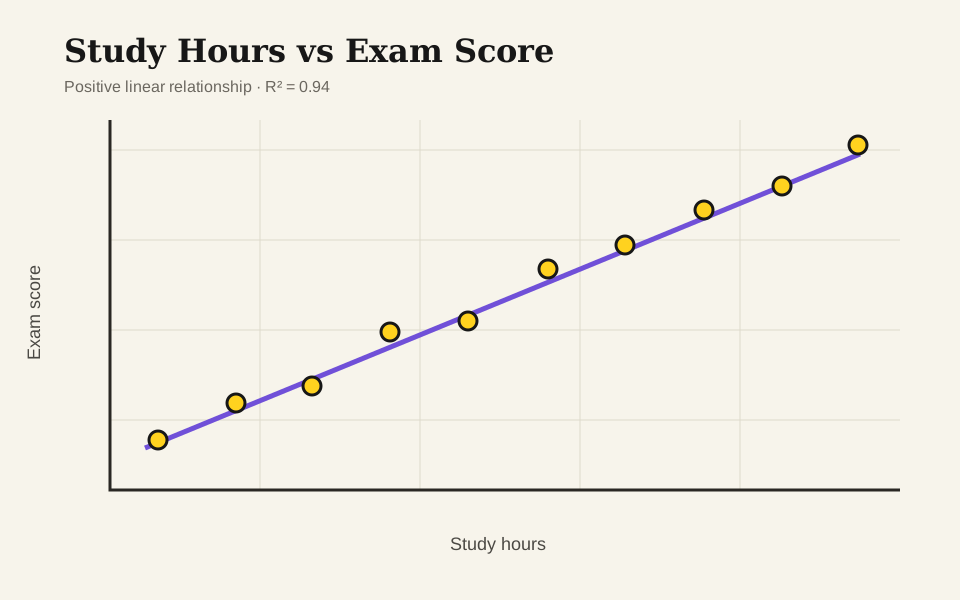
Scatter plot of study hours and exam scores

Scatter Plot Maker

Common questions

Bell Curve Generator FAQ

What can I create with this free online Bell Curve Generator?+

Create normal distribution charts from parameters or data, shade probabilities, solve percentile cutoffs and compare two curves without signing up. Download a 1920 × 1040 PNG, editable SVG or calculation CSV for free, with no watermark. Numeric calculations run locally in your browser.

How do I use the bell curve generator from data with a histogram overlay?+

Select From data, paste observations or import CSV, TSV or text, then choose a numeric column. Enable the histogram overlay to compare observed density with a fitted normal curve. Histogram area is normalized to 1 so both share a density scale. The overlay does not test normality.

How do I use the bell curve generator with Excel data?+

Copy a numeric column or tab-separated table from Excel and paste it into From data. Alternatively, save the worksheet as CSV and import that file. Select the numeric column and SD convention before reviewing the curve. Use decimal points; direct XLSX upload is not supported.

How do I use the bell curve generator with a mean and standard deviation?+

Choose Mean & SD and enter a mean and a strictly positive standard deviation. The mean sets the center; SD controls the spread. In raw-data mode, sample SD uses divisor n − 1, while population SD uses n. Choose the convention that matches what your observations represent.

How can I use a bell curve generator for grades?+

Paste exam scores in From data to calculate their mean and SD, then shade below a score threshold. Compare the modeled probability with the observed proportion of students below that threshold. A fitted curve does not establish normality or justify assigning fixed percentages of students to grade bands.

How do I create a bell curve with shaded areas and z-scores?+

Select Below a cutoff, Above a cutoff, Between two values or Outside two values. Change Boundary units to Z-scores to enter standardized cutoffs, or use original values. The displayed probability includes the full normal distribution, including tails beyond the visible chart; curve height itself is density, not probability.

How does the bell curve percentile calculator find a target value?+

Select Find a percentile cutoff and enter a percentage from 0.001 to 99.999. The inverse normal calculation solves X = μ + σΦ⁻¹(p), with p expressed as a fraction. Choose Find an upper-tail cutoff for a requested percentage above the value. Compare modeled and observed percentiles in the expandable table.

How can I draw a bell curve with a central 90% or 99% interval?+

Select Find a central coverage interval and enter 90 or 99. The generator solves two boundaries with equal tail probabilities, updates the shading and includes the boundaries in Calculation CSV. This describes individual values under a normal model; it is not a confidence interval for an estimated mean.

Your inputs. A clear curve.

Generate Your Bell Curve

Start with the standard normal example or paste your own data. Review the probability and take the chart with you.

Open Bell Curve Generator