• Logo
    PaperBananaAI Academic Illustration Generator
Home
  • Home
  • Studio
  • Scientific Illustration Generator
  • Poster Maker
  • Diagram Maker
  • Figure Editor
  • Pricing
My Creations
  • My Creations
  • Invite Friends
LogoPaperBanana
HomePromptsBlogPricingInvite Friends
  1. Home
  2. Tools
  3. Data Visualization
  4. Dendrogram Maker
PaperBanana

PaperBanana - AI-powered academic illustration generator

support@paperbanana.me
All Tools

Tool directory

AI Figure Tools

  • Scientific Illustration
  • Graphical Abstract Maker
  • Scientific Poster Maker
  • Scientific Diagram Maker
  • Scientific Figure Editor
  • Prompts

Research Diagrams

  • Cladogram Maker
  • Conceptual Framework Generator
  • Neural Network Diagram Generator
  • PRISMA Flow Diagram Generator
  • CONSORT Flow Diagram Generator

Graphic Organizers

  • Graphic Organizer Maker
  • Frayer Model Maker
  • KWL Chart Maker
  • Cause and Effect Graphic Organizer
  • Compare and Contrast Graphic Organizer
  • Spider Diagram Maker
  • Plot Diagram Maker
  • Syntactic Tree Generator
  • Sentence Diagram Generator
  • Punnett Square Maker
  • Venn Diagram Maker

Math & Physics

  • Molecular Orbital Diagram Generator
  • Lewis Dot Structure Generator
  • Factor Tree Generator
  • Number Line Generator
  • Force Diagram Maker
  • Bohr Model Maker

Data Visualization

  • Dendrogram Maker
  • Bell Curve Generator
  • Histogram Maker
  • Waterfall Chart Generator
  • Scientific Color Palette Generator
  • Sankey Diagram Generator
  • Scatter Plot Maker
  • Dot Plot Maker
  • Forest Plot Maker
  • Funnel Plot Maker
  • Kaplan-Meier Curve Maker
  • Box Plot Maker
  • Heatmap Generator
  • Volcano Plot Generator
  • Phylogenetic Tree Generator

Image & Submission

  • Scientific Figure Checker
  • Image Format Converter

© 2026 PaperBanana. All Rights Reserved.

Support

  • About
  • Blog
  • Pricing
  • Contact

Legal

  • Privacy Policy
  • Terms of Service
  • Acceptable Use

Free Dendrogram Maker for Hierarchical Clustering

Use the free Dendrogram Maker to cluster a CSV table or distance matrix, compare linkage methods and inspect shared merges. Save your setup or export SVG, PNG and result CSV for a report or statistics lesson.

Free · no account or creditsCompare 3 linkage methodsInspect shared mergesSave & restore projects

Your data, your method

Dendrogram Calculator from Table Data

Header row + sample names in the first column. Paste cells from Excel or use CSV/TSV. Up to 100 samples and 50 selected numeric features. Missing values are not filled.

Data preview · 8 samples · 4 columns
First six data rows and first six columns
SampleGene AGene BGene CGene D
Control 12.13.28.17.8
Control 22.43.07.98.2
Control 31.93.48.47.5
Treated 18.37.52.13.0
Treated 28.07.92.42.7
Treated 38.67.21.83.2

Preview shows up to six rows and six columns. All selected data is used.

Select numeric features

Z-scores give each feature a comparable scale. No scaling preserves the original units. Choose preprocessing to fit your question.

Save your clustering project

Download the source table, selected features, method, cut, title and layout as one JSON file. Restore it here later; calculations run again in your browser.

The downloaded project contains your input data. It is not uploaded or saved to an account. Temporary inspector highlights are not saved.

Your table, clustering and downloads stay in this browser. No account, credits or watermark.

Calculated hierarchy

Dendrogram preview & cluster members

Ready to inspect and download
8
samples
4
features
3
clusters at cut
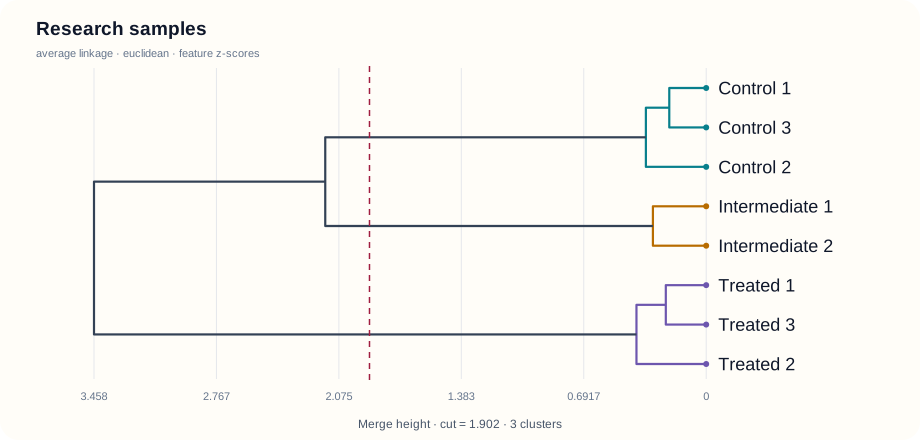
Dendrogram Maker result: 8 samples, average linkage, 3 clusters at cut height 1.902

Merge height measures Euclidean distance under average linkage. Leaf spacing does not measure distance. Equal distances use a deterministic node-ID tie break.

Merges at or below the cut stay together. Tied heights can change several groups at once. The cut is exploratory, not a significance test.

Cluster membership at this cut

  • Group 1 (3)Control 1 · Control 3 · Control 2
  • Group 2 (2)Intermediate 1 · Intermediate 2
  • Group 3 (3)Treated 1 · Treated 3 · Treated 2
Inspect all 7 merges
Leaves use IDs 0–7 in input order. Merged nodes start at 8. CSV includes leaf labels.
NodeLeftRightHeightSamples
8020.20862
9350.22822
10670.30112
11810.34083
12940.3943
1311102.1525
1413123.4588

This tree shows similarity for the chosen features and method. It does not establish ancestry, biological significance or an optimal number of clusters.

Compare linkage methods

Run single, complete and average linkage on the same selected data, distance and scaling. Cophenetic r compares the input distances with each pair’s first shared merge height.

Inspect a pair’s shared merge

Pick two samples to compare their input distance with the height where their clusters first join. Nearby labels do not necessarily mean a smaller distance.

Input pair distance
0.2384
First shared merge height
0.3408
Shared node / samples
11 / 3
At current cut
Together

Members of their smallest shared cluster: Control 1 · Control 3 · Control 2

The highlighted subtree uses magenta; ordinary group colors still identify the current cut. This inspects the computed hierarchy, not ancestry or significance.

Need a scientific illustration for your paper?

Turn your research methods, mechanisms, and workflows into clear figures with paper banana.

What Is a Dendrogram Maker?

A Dendrogram Maker turns numeric observations into a branching diagram of hierarchical clustering. Each leaf is a sample. Moving toward the root, branches join clusters at heights determined by your distance metric and linkage method.

This online dendrogram drawing tool computes the merge tree from your data. It keeps the heights, sample labels and cluster members connected, so you can check what the figure means. A cut line selects groups; rotating the layout changes how the tree is drawn, without changing the calculation.

Choose a horizontal or vertical rectangular layout. Ward linkage and circular layouts are not included. The dendrogram shows similarity under your settings; it does not establish evolutionary ancestry or statistical significance.

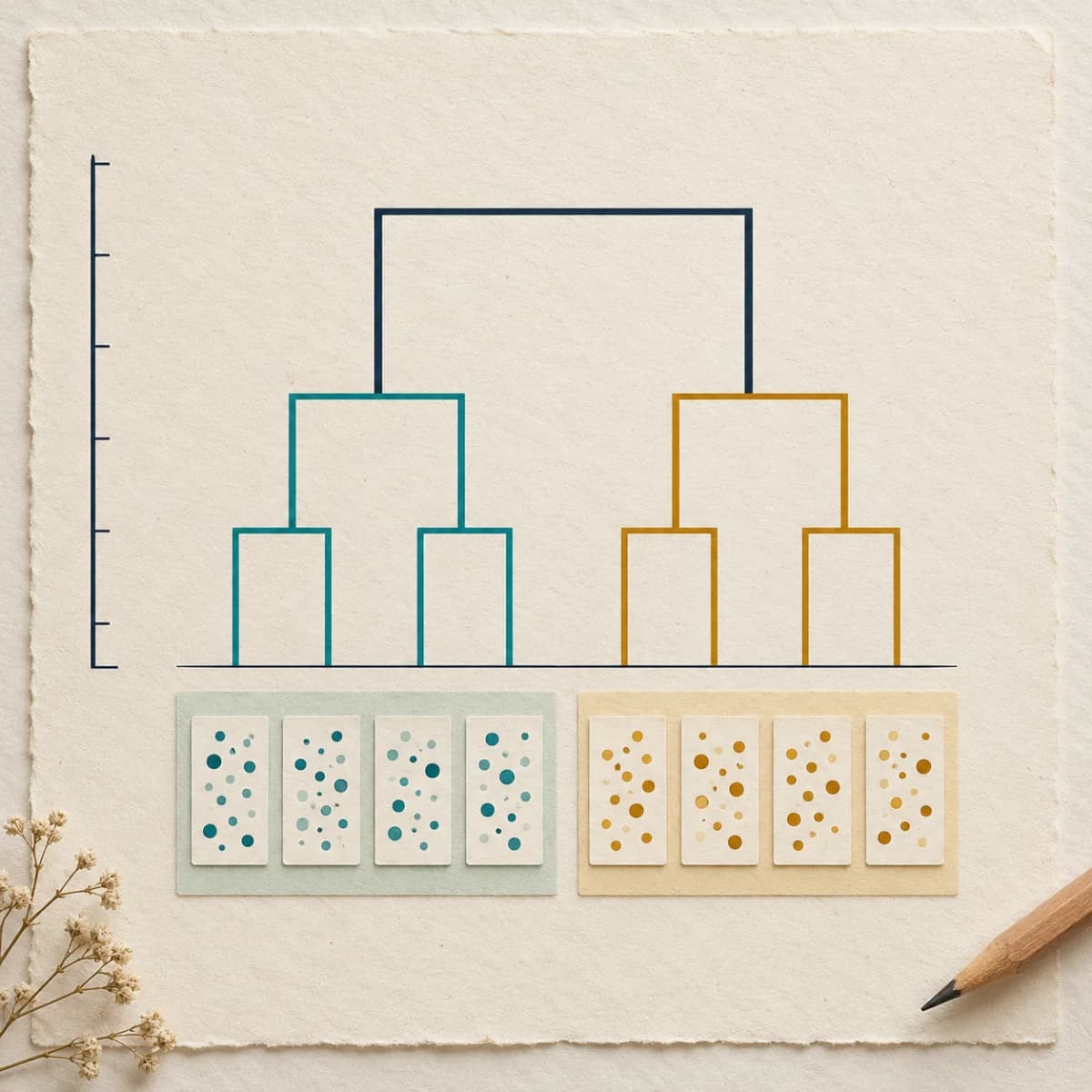
Dendrogram Maker concept: sample groups joined through a hierarchical tree beside a merge-height ruler.
Conceptual illustration. The interactive preview and examples use calculated merge heights.

From a tree to an explanation

Compare Dendrogram Linkage Methods

Compare methods, trace a pair, or save your setup. Free, with no login.

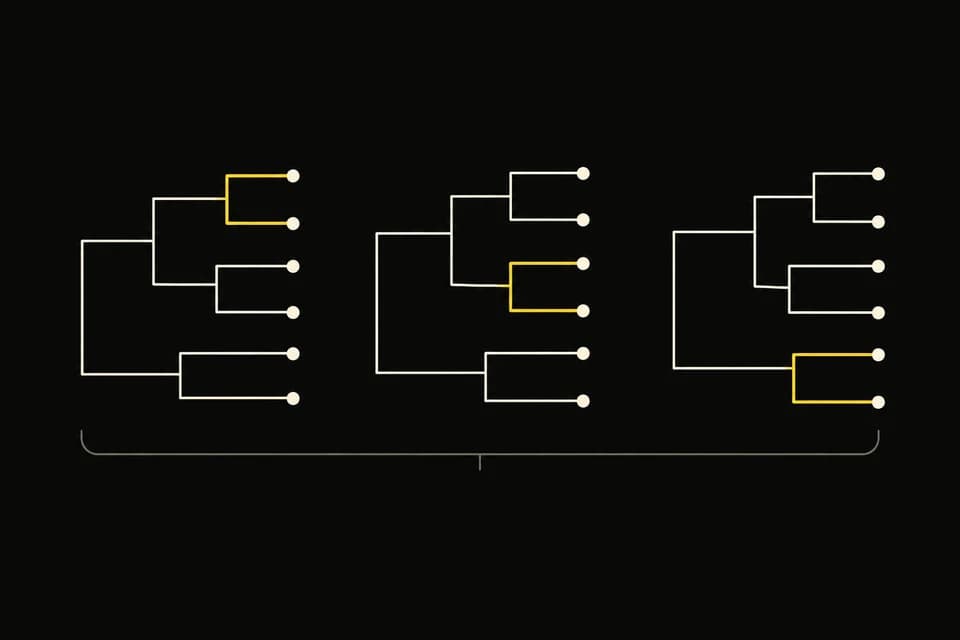
Illustration of three dendrograms with different merge positions.

Compare three methods

Single, complete or average: compare the same data, then apply a method or export the comparison CSV.

How comparisons work

Run single, complete and average linkage without re-entering your table. Compare root heights, group counts at the same cut and cophenetic correlation r, then apply a method to the main tree or export the comparison CSV.

Cophenetic r measures linear agreement between input distances and pairwise shared-merge heights. Constant distances or too few pairs produce an undefined score; higher r does not establish valid groups or an optimal cut.
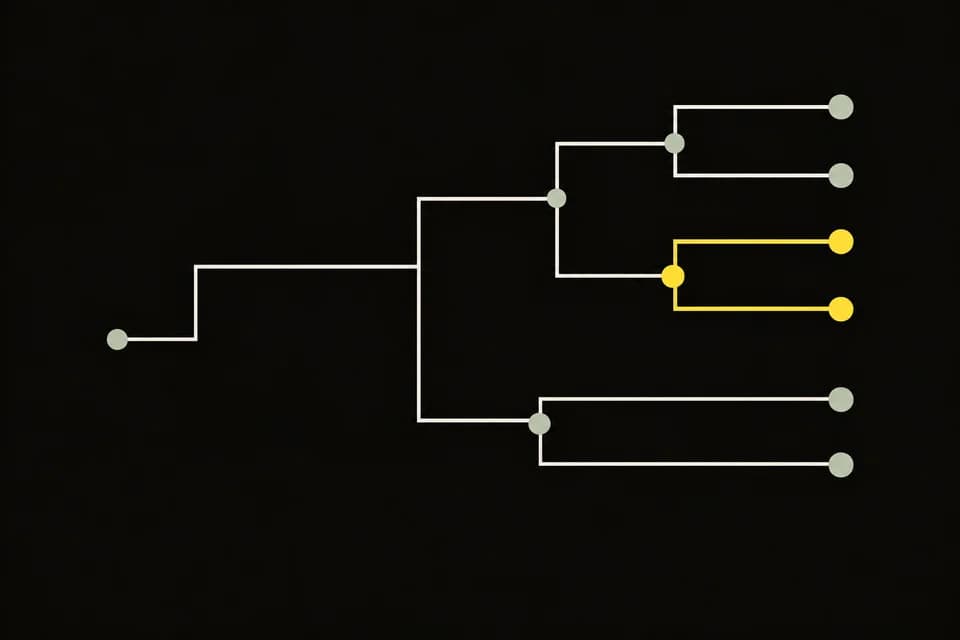

Illustration of two samples highlighted at their first shared merge.

Trace two samples

See where two samples first join, highlight their shared cluster and export the pair details.

What the inspector reports

Choose two sample labels to see their input distance, first shared merge height, node ID and every member of their smallest shared cluster. Check whether the samples stay together at your current cut, highlight the subtree and export a pair-inspection CSV.

The inspector follows the computed hierarchy, so it works in either layout. Highlighting affects the drawing and figure exports; it does not change cluster membership.

Illustration of a folder holding data, a tree and analysis settings.

Save your setup

Keep your data and settings in one project JSON. Restore it later to recalculate in your browser.

What the project saves

Download one project JSON containing the source table, selected features, input mode, metric, linkage, scaling, cut height, figure title, label size and layout. Restore the file to validate the input and recalculate the tree in your browser.

Save before leaving the page: projects are not stored in an account or recovered automatically. The file includes your source data. Temporary inspector highlights are not saved.

Try Dendrogram Maker

Explore a Hierarchical Clustering Dendrogram Example

Load a complete example, including its data and method. These synthetic datasets demonstrate the workflow; they are not experimental findings.

From samples to groups

Use a Dendrogram in Biology, Teaching and Data Analysis

The same tree can answer different questions. Choose features and preprocessing that fit the comparison you intend to make.

Calculated average-linkage dendrogram for eight synthetic research samples.

Researchers: compare gene-expression sample profiles

Explore similarity across a small gene-expression or assay table. Check sample labels, select numeric features and decide whether differences in feature scale should influence distance. Clustering alone does not establish biological significance.

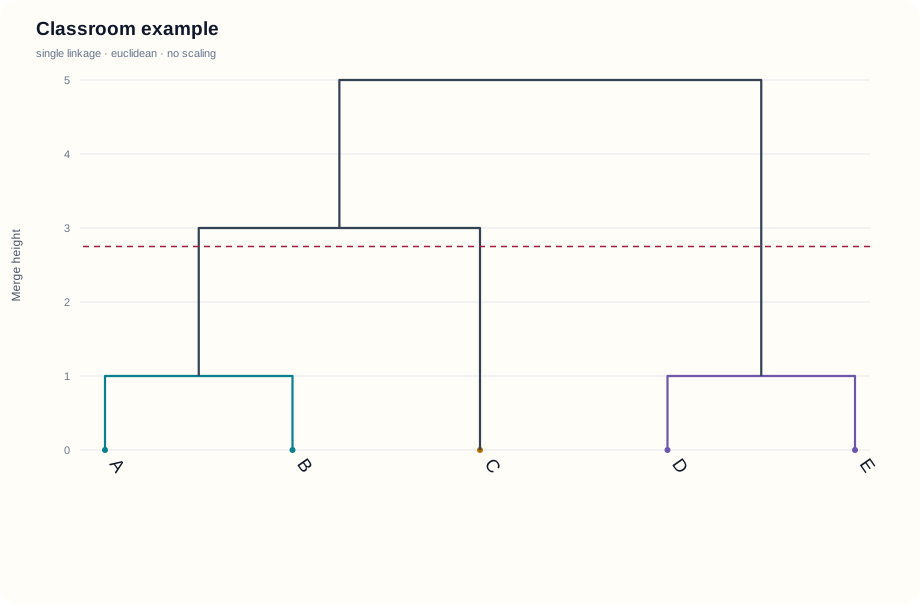
Five-observation teaching dendrogram with actual single-linkage merge heights.

Students: explain clustering in a statistics assignment

Start with five observations, change the linkage method and follow the merge heights. Export the tree and merge table to explain your working in a statistics assignment.

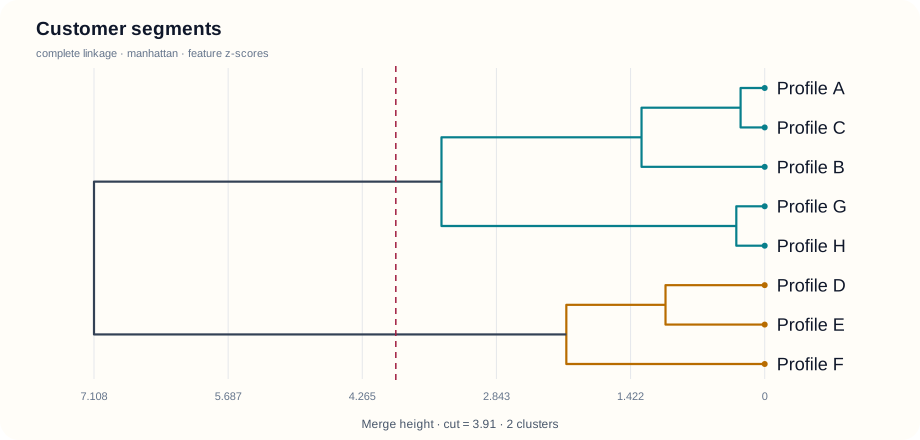
Complete-linkage dendrogram of synthetic customer profiles.

Analysts: explore survey and customer profiles

Group survey or purchase profiles before forming a hypothesis about segments. Standardize features when units differ, then export a sample-to-cluster table for further analysis.

Make the calculation visible

Understand Dendrogram Clustering and Branch Heights

The branch positions come from the selected method and data. Keep the diagram, settings and exported results together.

Create dendrograms from CSV or Excel-pasted data

Put samples in rows and features in columns, with sample names in the first column. Paste a spreadsheet table or upload CSV/TSV, preview the values and select the features to include. Missing or nonnumeric selected cells are flagged before calculation.

Try the Dendrogram Maker
Research-sample dendrogram calculated from four numeric features.

Compare distances and linkage for a research report

Single linkage uses the nearest pair, complete linkage uses the farthest pair, and average linkage averages all cross-cluster pairs with sample-count weighting. Choose Euclidean, Manhattan or maximum distance. Feature z-scores use sample standard deviation; precomputed distances bypass scaling.

Try the Dendrogram Maker
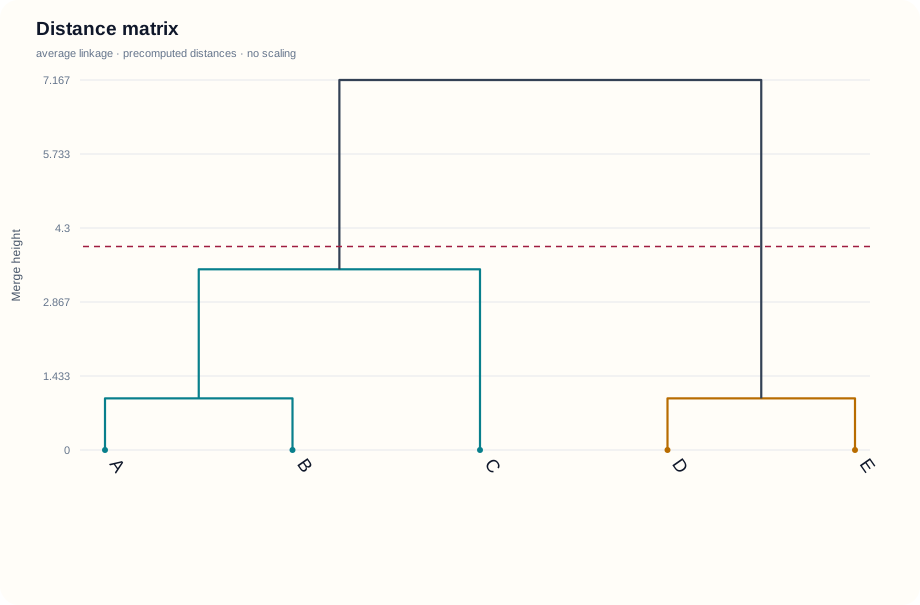
Calculated tree from a symmetric precomputed distance matrix.

Export cluster members for a paper or statistics assignment

Move the cut line to see which samples remain together at that height. Equal-height merges are included together. Export a light-background SVG or PNG, a membership CSV with your settings, and a merge table with node IDs and heights. Colors repeat after eight groups; use group labels to distinguish them.

Try the Dendrogram Maker
Profile dendrogram with colored groups below a chosen cut height.

Three steps

How to Draw a Dendrogram Online from Your Data

Paste data into Dendrogram Maker, choose how to compare samples, then export a tree and results you can check.

  1. Eight-sample Dendrogram Maker example used to check labeled numeric input.

    01Paste a table or import a distance matrix

    Use samples in rows, feature names in the header and labels in the first column. Paste from Excel or upload CSV/TSV. For distances, select matrix mode and provide matching row and column names.

  2. Five-sample clustering example for reviewing merge heights in Dendrogram Maker.

    02Choose the method and read the tree

    Select numeric features, a distance, scaling and linkage. Generate, then compare merge heights and move the cut line. Review the member list instead of reading distance from leaf spacing.

  3. Customer-profile dendrogram with colored clusters for the Dendrogram Maker export step.

    03Download the figure and results

    Switch horizontal or vertical layout, adjust label size and export SVG or PNG. Keep the membership and merge CSV files with your data for a record of the calculation.

Try Dendrogram Maker Free

Related tools

Continue Exploring Your Research Data

Use a heatmap for the feature values, or choose a biology tree tool when your task concerns traits or supplied phylogenetic topology.

View All Tools
Heatmap Generator with colored feature values.

Heatmap Generator

Cladogram Maker showing shared derived traits.

Cladogram Maker

Phylogenetic tree diagram with labeled tips.

Phylogenetic Tree Generator

Categorical scientific color palette.

Scientific Color Palette Generator

Questions

Dendrogram Maker FAQ

How do I use a dendrogram maker online with Excel or CSV data?+

Paste a header row, sample names in the first column and numeric features in the remaining columns. Dendrogram Maker accepts Excel cell paste, CSV, TSV or TXT. Select the features to compare, then choose a distance, scaling and linkage. For XLSX, paste its cells or save as CSV first.

Is this online dendrogram maker free without signing up?+

All clustering, method comparisons, pair inspections, project files and SVG/PNG/CSV exports are free without an account, credits or watermark. Calculations run in your browser. Use up to 100 samples and 50 selected numeric features, or a full 100 × 100 distance matrix.

What does a hierarchical clustering dendrogram example show?+

Each leaf represents a sample; each branch joins two existing clusters at a calculated height. In the classroom dendrogram clustering example, A=0 and B=1 merge at height 1 with single linkage. Read distance from the merge-height axis, rather than spacing between labels. Different linkage methods can produce different trees.

What is a dendrogram in clustering, and how do I choose a cut height?+

A dendrogram in clustering shows how samples join into nested groups. A cut at height h includes merges at h or below; connections above it stay separate. Move the cut line to inspect cluster members. Equal-height merges can change several groups at once. Visual separation does not establish statistical significance.

Can I use this dendrogram generator with a distance matrix?+

Choose Distance matrix and supply a full symmetric, nonnegative square matrix with zero diagonal entries. Row and column labels must match in the same order. Dendrogram Maker uses those supplied distances directly, bypassing metric selection and feature scaling. Triangular-only matrices are not accepted; resolve missing values before calculating.

How can I compare dendrogram linkage methods and cophenetic correlation?+

Open Compare & inspect after generating a tree, then choose Compare 3 methods. The table compares single, complete and average linkage using the same input, distance and scaling. Cophenetic r measures linear agreement with input distances; it does not prove valid groups. Apply a method or download the comparison CSV.

How do I inspect where two samples merge in a dendrogram?+

Select two different samples in Compare & inspect. The inspector reports their input distance, first shared merge height, node ID, complete shared-cluster membership and relationship at your current cut. Highlight the shared subtree on the main diagram or download pair CSV; highlighting leaves the calculated tree and cluster membership unchanged.

How do I save a project in this dendrogram drawing tool and export SVG, PNG or CSV?+

Use Save project JSON to keep the source table, selected features, calculation settings, cut and layout. Restore files up to 1 MB to recalculate locally later; there is no automatic account storage. Export SVG or PNG and keep membership, merge or comparison CSV alongside it. Project files contain your source data.

Start with your data

Build a Dendrogram You Can Explain

Load a sample table or paste your own, compare the merge heights and download the result. Free, online and ready without an account.

Try Dendrogram Maker Free